Showing posts with label activate. Show all posts
Showing posts with label activate. Show all posts
Thursday, May 11, 2017
How to Activate Office 2013 without Product Key
How to Activate Office 2013 without Product Key
 No matter this is your first time or second time to install Microsoft Office 2013, without product key, how to activate Office 2013?
As we all know, Microsoft 2013 has two editions, VOL and Retail. The VOL edition is also called batch authorized version. The other is Retail edition, which is provided in computer shop with Office installation CD. And there are several benefits if you get Office 2013 VOL edition. For example, one key of VOL edition could activate a lot of computers through KMS server, while one key of Retail only activates a computer installed with Office 2013 by calling Microsoft service during installation. You would find Office 2013 VOL is convenient than Retail edition to activate.
So when we get ready to activate Office Professional 2013, we have to know which edition our computer is installed with.
Maybe you know that when we want to see the product version, we just need to open ÒFileÓ Ð ÒAccountsÓ, and you will find product information showing product version. But this does not applies to Office 2013. No matter how many times you try, you could only see Microsoft Office Professional Plus 2013. So how to look for what Office 2013 Edition is on your computer?
Step 1: Confirm Office 2013 Edition on Computer
After you access Windows 8 computer, run CMD with administrator or account with admin privileges. Turn to installation directory of Office, and type command: cscript ospp.vbs /dstatus
If what you see is ÒLICENSE DESCRIPTION: Office 15, RETAIL(Grace) channel, it means your computer is installed with Retail edition, otherwise, it will show ÒLICENSE DESCRIPTION: Office 15, VOLUME_KMSCLIENT channel to let you know this is Office 2013 VOL edition.
If what you see is ÒLICENSE DESCRIPTION: Office 15, RETAIL(Grace) channel, it means your computer is installed with Retail edition, otherwise, it will show ÒLICENSE DESCRIPTION: Office 15, VOLUME_KMSCLIENT channel to let you know this is Office 2013 VOL edition.
When you have understood which edition your computer Office is, activation will become easy. But you have to make sure Windows 8 has been activated before you active Office 2013. Because Office 2013 Retail is activated by call, so now I mainly introduce how to activate Office 2013 VOL with KMS.

However, if now the KMS server couldnÕt work, take Microsoft Toolkit to activate Microsoft Office 2013.
However, if now the KMS server couldnÕt work, take Microsoft Toolkit to activate Microsoft Office 2013.
Step 2: Activate Office 2013 VOL with Toolkit
- Get Microsoft Toolkit first.
Download here: http://goo.gl/bfl56m - After Microsoft Office 2013 installation, run Microsoft Toolkit.

ERROR CODE: 0x4004F00C
ERROR DESCRIPTION: The Software Licensing Service reported that the application is running within the valid grace period.
Even though they are error message prompting you, actually Office 2013 is activated successfully. Now you can try to run Office 2013 and experience function on it.

The above activation method is used when you first install Microsoft Office really without product key. When you want to install it on another computer, it is an available way too.
But besides this, there is another effective and guaranteed tool for you to find out product key after you forget or lost Office product key. And then activate Office with forgotten product key. It is called Product Key Finder. You dont need to know anything about command or complex programs. Just get product key finder and click one button to find product key.
Related Articles:
- Office 2013 Product Key Finder
- Find Lost Windows/Office Product Key easily with one click
- How to Find Windows 8.1 Activation Key
Go to link Download

Monday, May 1, 2017
How to Activate Windows 8 Pro without Product Key
How to Activate Windows 8 Pro without Product Key
When Windows 8 releases, I got Windows 8 to have a try on VMware Workstation. And I activated it with KMS. But now Windows 8 has become not activated because time is up.
You could see the details in PC info.
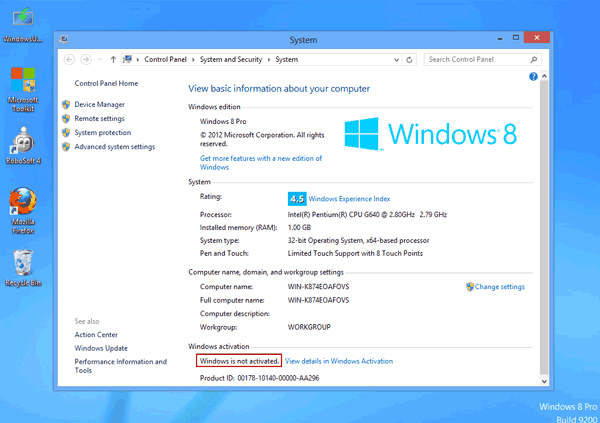
At this time, we could choose to activate Windows 8 with key directly. Or if we donÕt have key, letÕs learn to activate Windows 8 with Microsoft Toolkit like the following introductions.
1. Find and download appropriate Microsoft Toolkit.
Here we get Microsoft Toolkit 2.4.8, which is available for Windows 8.1/8/7/Vista and Windows server 2008/2012 (R2).
2. Run Microsoft Toolkit as administrator in Windows 8 virtual machine.
Microsoft Toolkit could activate Windows and Office without product key. Now we choose Windows system to activate.
3. In "Product Keys" option, select Windows system type and version in "Product" and "Edition". And then click "Install" button.
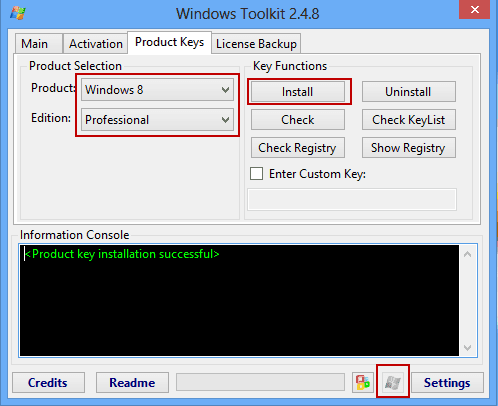
4. When product key has been installed successfully, click "Activate" button to make Windows 8 pro activated.
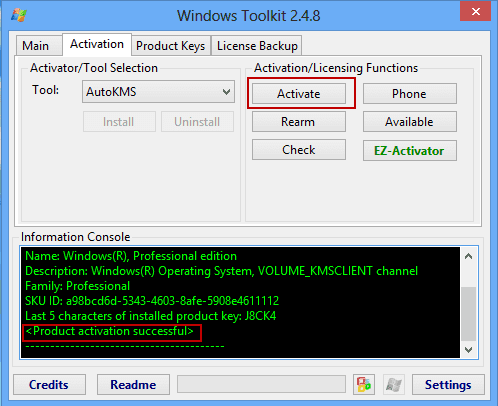
Few seconds later, message "Product activation successful" would appear in Information Console box at the bottom side of Microsoft Toolkit program window. Windows 8 has been activated at this time.
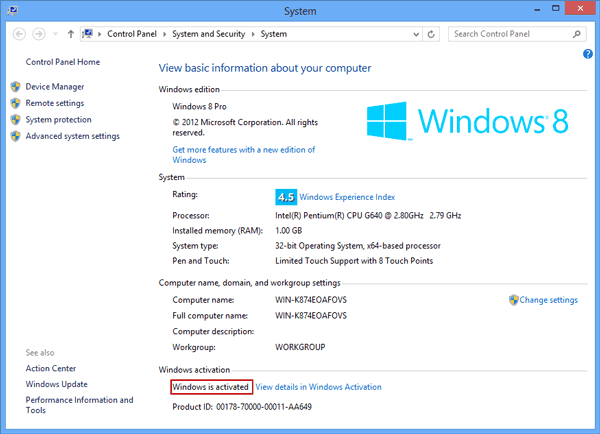
Now, if you open PC info, you could see Windows has been activated.
Related Passages:
Related Passages:
- How to Activate Office 2013 without Product Key
- How to Find Windows 8.1 Activation Key
- How to Factory Reset Windows 8 without Password
- Windows Server 2012 R2 Activation Key Finder
- Four Ways to Create Windows 8 Logon Password and How to Use
Go to link Download
Subscribe to:
Posts (Atom)