Showing posts with label menu. Show all posts
Showing posts with label menu. Show all posts
Sunday, April 9, 2017
The Windows Secret And Hidden Send To Menu Items
The Windows Secret And Hidden Send To Menu Items

Using windows operating system equipped PCs and Laptops is something we are all familiar with it and apparently we all seem relaxed and happy with the clicks we make whenever we are editing a file, clicking on a link, or pinning an icon to the task bar. But it will be more interesting and easier if we knew all the tips and tricks to do all of those tasks in a simpler ways i.e. using shortcuts and hotkeys.
And today we will go deep on the windows built in functions specially the handy ones and weÕll explore something odd and interesting about the Òsend toÓ function. Hopefully we are all familiar about the concept and how it works but what I am going to show you is how to access the secret Òsend toÓ menu items.
Well this may be little bit confusing because you already knew that the Òsend toÓ function is handy whenever you right-click on a folder, file, or icon on the desktop but what are the secret menu items I am talking about. Just follow the below steps and you will get idea instantly.
- Hold down the ÒSHIFTÓ key on your keyboard and right-click on any file or folder on your Desktop.
- Definitely on a moment a menu will popup, which contains a lot of menu items, donÕt get impressed because it may look like the actual menu youve usually seen but itÕs not; you are almost there to explore the hidden and the secret Òsend toÓ menu items just keep holding the ÒSHIFTÓ key and click on the Òsend toÓ menu item.
- Now you will see a plenty of new options which gives you some secret great options like the one in figure 0.1. Some of the secret send to menu items are Mail Recipient, Fax Recipient, Bluetooth Device option if you have installed any. And some other useful menu items which you can directly send to that specific document or folder to any place you want.
 |
| Figure 0.1 |
Hopefully and successfully youve seen a variety of secret and hidden options under the Òsend toÓ menu, but give another glance to the popup menu youÕll see that whenever you right-click on a file or folder while holding down the ÒSHIFTÓ key the menu items will show up are tremendously useful than ever and they are more than enough, so keep in mind with the help of ÒSHIFTÓ key we explored the hidden and the secret send to menu items and some other useful things as well. And that is the beauty of using the hot-keys and sticky-keys.
Final note: if youve already knew the trick I have just demonstrated, 95% of the regular windows users donÔt aware of it, so participate spreading the word and share it with your friends and loved ones.
Go to link Download

Monday, January 30, 2017
USB HDD BOOT v2 5 2 T‡¼Áo menu boot c‡È©u h‡Èª €Ôa n€Äng cÌ i €Ô‡¼át windows t‡ÈÇ usb
USB HDD BOOT v2 5 2 T‡¼Áo menu boot c‡È©u h‡Èª €Ôa n€Äng cÌ i €Ô‡¼át windows t‡ÈÇ usb

Ngoˆi ra ?ng d?ng nˆy c˜n h? tr? kh‡ t?t cho ng??i dng trong vi?c cˆi ??t c‡c H?H Windows XP /2k3 /7 /8 /8.1 /8.1 Update /10 /Windows Server 2008 R2 /Windows Server 2012 R2 t? c‡c g—i cˆi ??t d?ng *.iso v?i usb ho?c ? c?ng di ??ng .


LINK DOWNLOAD USB-HDD BOOT v2.5.2 : T?I ?åY ho?c T?I ?åY
H??NG D?N S? D?NG USB-HDD BOOT v2.5.2 : T?I ?åY ho?c T?I ?åY
T?O FILE BOOT.WIM H? TR? CËI ??T CçC WINDOWS : T?I ?åY ho?c T?I ?åY
H??NG D?N S? D?NG USB-HDD BOOT v2.5.2 : T?I ?åY ho?c T?I ?åY
T?O FILE BOOT.WIM H? TR? CËI ??T CçC WINDOWS : T?I ?åY ho?c T?I ?åY
Go to link Download
Saturday, October 29, 2016
Stardock Start10 Menu Iniciar
Stardock Start10 Menu Iniciar
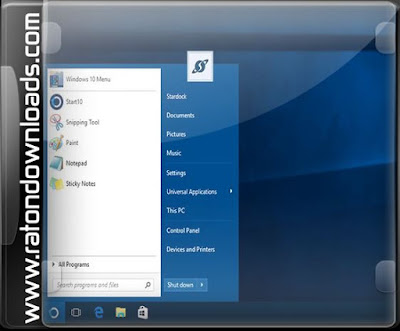
Quando o Windows 10 foi lanado oficialmente, Ž destinado a fornecer aos usu‡rios em todo o mundo ambos com uma interface familiar e com inœmeras fun›es para aumentar a sua produtividade. No entanto, se voc Ž uma das pessoas que consideram o Menu Iniciar ainda poderia usar algum trabalho, especialmente quando se trata de simplific‡-lo, voc pode tentar Start10.
Caracter’sticas principais
- Menu de pesquisa est‡ de volta ao menu Iniciar
- Restaura os links r‡pidos para a funcionalidade do sistema central
- MantŽm a "Todos os Programas" met‡fora pasta
- Textura pode ser aplicada a barra de fundo e Start10
Menu Iniciar do Windows 10 pode assemelhar-se a um no Windows 7
Devido ˆ Start10, voc ter‡ a possibilidade de fazer o Menu Iniciar no seu computador Windows 10 assemelhar-se o inclu’do no Windows 7. Isso significa que ele vem com uma caixa de busca para procurar arquivos, pastas ou programas, ao mesmo tempo, incluindo v‡rias op›es de energia (sair, fechadura, rein’cio, desligamento ou hiberna‹o).
Alterar o tema e as cores do Menu Iniciar
Se voc tiver algum tempo de sobra, voc pode experimentar com as muitas op›es de personaliza‹o de Start10 atŽ que voc esteja satisfeito com o resultado. Por exemplo, voc pode mudar para um estilo de menu Iniciar diferente ou tema, bem como escolher uma imagem BMP PNG personalizado ou para o bot‹o Iniciar. A transparncia e as cores textura pode ser alterada, bem como, com apenas alguns cliques do mouse. Depois de ter selecionado uma nova configura‹o, voc pode simplesmente abrir o Menu Iniciar e ver a sua aparncia mudou em tempo real, sem a necessidade de reiniciar o PC.
Personalizar os ’cones e atalhos mostrados no Menu Iniciar
Devido ˆ Start10, voc tambŽm pode personalizar os links exibidos no menu Iniciar, mesmo se voc n‹o Ž um perito em inform‡tica. Voc pode selecionar as pastas que devem ser acess’veis no lado direito, bem como definir o seu comportamento de abertura. Os aplicativos recŽm-instalados podem ser destacadas no menu Iniciar, para torn‡-los mais vis’veis, e o nœmero de grandes ’cones podem ser definidos pelo usu‡rio.
O que h‡ de novo na vers‹o 1.10:
- WindowBlinds10 ajustes de compatibilidade
- Tweak UI de configura‹o para alta DPI
- Multi-Idiomas (Portugus Brasil)
Tamanho: 20MB

Download MEGA
Download MEGA :


Go to link Download
Subscribe to:
Posts (Atom)