Showing posts with label i. Show all posts
Showing posts with label i. Show all posts
Wednesday, May 24, 2017
Can I Decrypt Encrypted PowerPoint File in My Laptop
Can I Decrypt Encrypted PowerPoint File in My Laptop
"ThatÕs so unfortunately. My PPT file encrypted with password couldnÕt be open, while it would be shown at afternoon. How can I decrypt this PPT file without any damage effectively and instantly?"
A tool is an effective way to solve such problems on computer. If you could find a powerful password recovery tool for encrypted PowerPoint file, it would half the work with double results for PowerPoint file decryption.
Through certification, PowerPoint Password Genius is such powerful tool to decrypt encrypted PowerPoint file, PPT file or PPTX file.
LetÕs do decrypt password protected PowerPoint file with PowerPoint Password Genius.
Step 1: Install PowerPoint Password Genius full version on computer.
A tool is an effective way to solve such problems on computer. If you could find a powerful password recovery tool for encrypted PowerPoint file, it would half the work with double results for PowerPoint file decryption.
Through certification, PowerPoint Password Genius is such powerful tool to decrypt encrypted PowerPoint file, PPT file or PPTX file.
LetÕs do decrypt password protected PowerPoint file with PowerPoint Password Genius.
Step 1: Install PowerPoint Password Genius full version on computer.
Why choose full version? The trial version only could decrypt PowerPoint file set with password less than 3 characters, while full version can decrypt any PowerPoint file which is set with any complex password.
Step 2: Browse encrypted PowerPoint file on computer and import it into password tool.
Step 2: Browse encrypted PowerPoint file on computer and import it into password tool.
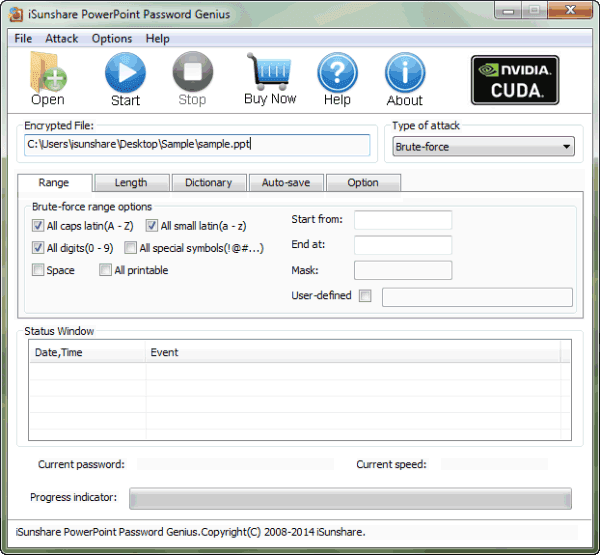
Run PowerPoint Password Genius and click "Open" button to browse encrypted PowerPoint file on your computer. And then import it into password tool. You would see it in "Encrypted File" box.
Step 3: Select PowerPoint password attack method.
Step 3: Select PowerPoint password attack method.
Brute-force, Mask, Dictionary and Smart are four password attack methods provided in PowerPoint Password Genius. Select one from them in drop-down box of "Type of attack".
Brute-force:
Brute-force:
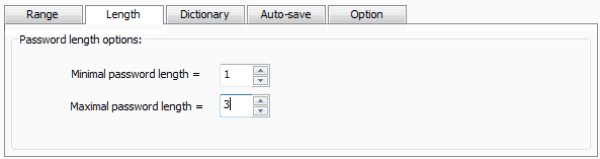
When you have no information about PowerPoint lost password, select Brute-force and set password range and length for it.
Mask:
Mask:
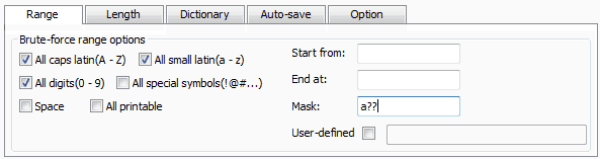
When you have part of PowerPoint lost password, select Mask, and set "Mask" parameter.
Dictionary:
Dictionary:
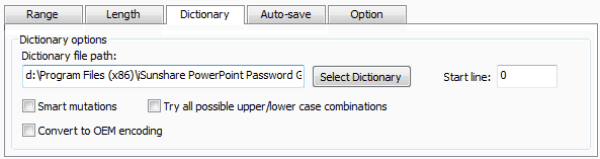
There are several common password included in Dictionary. Select it if lost PowerPoint password is common.
Smart:
Smart:
If you have no idea to choose which one, select Smart attack. But if you want to find PowerPoint password faster, select previous three attack types according to lost password.
Step 4: Click "Start" button to recover encrypted PowerPoint file password.
Step 4: Click "Start" button to recover encrypted PowerPoint file password.
After all the settings made up, click "Start" button on menu. Instantly, you could see PowerPoint password appearing in new window.
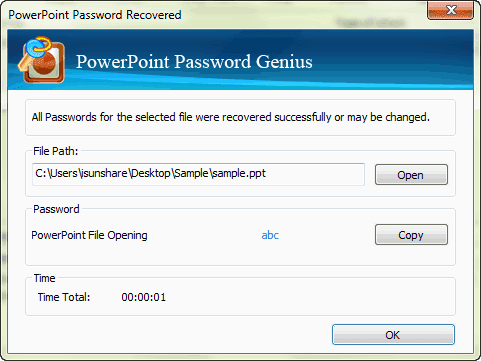 Copy it to save or open encrypted PowerPoint password. Now encrypted PowerPoint file has been decrypted.
Related Articles:
Related Articles:
- Could I Open Encrypted Outlook Data File without Password
- How to Open Password Protected Access Database without Password
- How to Open Password Protected Excel Worksheets without Password
- Tips on Office Password Encryption and Decryption
Go to link Download

Saturday, April 29, 2017
Which Version of Windows 8 Could I Choose to Install
Which Version of Windows 8 Could I Choose to Install
Compared to Windows 7, there are only four versions for Windows 8 to choose, Windows 8 Standard, Windows 8 Professional, Windows 8 Enterprise and Windows RT. And these four versions satisfy the demand of common consumer, professional computer user, and enterprise user, which makes computer usersÕ choice easy.
Now see the simple introductions about Windows 8 versions.
Windows 8 Standard:
Generally, Windows 8 Standard is called Windows 8. For common computer user, Windows 8 is the best choice. Windows 8 provides bran-new Windows Store, Windows Resource Management, Task Management and other services only provided in previous Windows Ultimate and Enterprise. And you can choose appropriate language version according to your requirements.
Now see the simple introductions about Windows 8 versions.
Windows 8 Standard:
Generally, Windows 8 Standard is called Windows 8. For common computer user, Windows 8 is the best choice. Windows 8 provides bran-new Windows Store, Windows Resource Management, Task Management and other services only provided in previous Windows Ultimate and Enterprise. And you can choose appropriate language version according to your requirements.
Windows 8 Professional:
Also called Windows 8 Pro, a series of Windows 8 powerful technology are provided for technophiles and business/technical personnel, including encryption, virtualization, PC management and domain name connection etc. Compared with Windows 8 Standard, this version provides more functions, but they are not necessary for most general users.
Windows 8 Enterprise:
Besides the functions included in Windows 8 Pro, Windows 8 Enterprise also provides PC management and deployment, advanced safety and virtualization etc.
The special function in Windows 8 Enterprise introduced in details below:
- Windows To Go: Enterprise user could get "Bring Your Own PC" experience, and user could run Windows 8 anytime with USB device, making Windows operational system, application and data gone with computer user.
- DirectAccess: Enterprise user could login enterprise Intranet without VPN. It helps manager maintain computer and update software.
- BranchCache: It allows user to cache file, web page and other content, avoiding frequently repeated downloads.
- AppLocker: Limit running file and application allowed by user groups to solve problem.
- VDI enhanced edition: Bring enhancement in Microsoft Remote FX and Windows Server 2012, and rich experience for user because of 3D graphic display and touching device.
- New Windows 8 Application Deployment: Windows 8 Enterprise user could get the auto deployment of Windows 8 Metro application.
Windows RT:
This is new Windows system version. It would not be on sale individually, released only by pre-installation. There is optimized Microsoft Word, Excel, PowerPoint and OneNote, but unfortunately not allowed other desktop software installation. Users have to create Metro application through WinRT development environment.
So according to the introduction above, now make a summarization to see which Windows system version applies to which kind of computer user.
Windows 8 version | Users Position |
Standard | Common computer user |
Professional | Professional computer user, technophiles |
Enterprise | Enterprise user |
After the installation of Windows 8, the next step is to activate Windows 8.
Related Articles:
- Windows 8 Security Knowledge
- 10 New Features in Windows 8.1
- How to Find Windows 8.1 Activation Key
- 8 Effective Ways for Windows 8 Password Reset
- 10 General Secure Settings Options for Windows 8
Go to link Download
Tuesday, March 21, 2017
I am sorry but theres no polite way to put this but
I am sorry but theres no polite way to put this but
...they are lying again. Headline and Article.
Heir to Blair indeed.
I do not have time to fisk the whole nonsense, so lets consider what would happen to the GBP if (when?) we exit. We should note that Cameron/Osborne comments are pure speculation. The numbers they cite are just fiction. (In lots of ways this sort of lunatic economic soothsaying is what has got us into this mess in the first place.)
Initially there will be uncertainty in the currency markets. (Personally I think that a lot of that is already in the price.). The markets will then take time to work out what is going on. I dont think that that will take long - financial markets being among the most efficient markets. The markets will quickly realise that we are off the hook for all our contingent liabilities to the EU. These are both massive and we have the true quantum deliberately hidden from us. They will also realise that the governments finances have been materially improved by about £9 Bn per annum. (I concede that there is a lot of uncertainty as to just how much the EU costs us). This will mean that we can repay our international debts quicker. Although it will take longer (the quangoistas will fight like Hell to hang onto their power and fat entitlements - I fully expect them to argue that now we have left the EU we need more regulation) the deadweight costs of EU created regulatory burden will be removed from the 55% of our international trade that does not go to the EU and all of it from the 90% of our GDP which is internal. Production costs in the UK will fall. (If the Government had any clue what is was doing it could immediately cut taxes on production and hence create a low tax economy which in turn would immediately cancel out the 4% to 5% external tariff on exports to the EU. Next and crucially we will be able to return to proper supervision of our banks. (As you know I hold that Bank of England is largely incompetent at this and the FCA / PRA totally useless), but we could start to address the structure of bank capital outside the constraints of the EUs agenda that is to keep itself and the Euro in being come what may, mostly by printing money. The City would profit from this. I also fully expect us to quickly become the largest offshore financial centre on the planet. (As part of this I also fully expect London land prices to carry on rising - but we know how to address this, dont we)
Overall I expect GBP to rise in relative price.
Which is good because well be able to buy Mercedes cheaper. Question, What will Mercedes do with all those lovely GBPs? Where can they spend them?
Cameron / Osborne whole scare mongering meme is based entirely on ill thought out speculation and deceit.
Go to link Download
Monday, January 30, 2017
USB HDD BOOT v2 5 2 T‡¼Áo menu boot c‡È©u h‡Èª €Ôa n€Äng cÌ i €Ô‡¼át windows t‡ÈÇ usb
USB HDD BOOT v2 5 2 T‡¼Áo menu boot c‡È©u h‡Èª €Ôa n€Äng cÌ i €Ô‡¼át windows t‡ÈÇ usb

Ngoˆi ra ?ng d?ng nˆy c˜n h? tr? kh‡ t?t cho ng??i dng trong vi?c cˆi ??t c‡c H?H Windows XP /2k3 /7 /8 /8.1 /8.1 Update /10 /Windows Server 2008 R2 /Windows Server 2012 R2 t? c‡c g—i cˆi ??t d?ng *.iso v?i usb ho?c ? c?ng di ??ng .


LINK DOWNLOAD USB-HDD BOOT v2.5.2 : T?I ?åY ho?c T?I ?åY
H??NG D?N S? D?NG USB-HDD BOOT v2.5.2 : T?I ?åY ho?c T?I ?åY
T?O FILE BOOT.WIM H? TR? CËI ??T CçC WINDOWS : T?I ?åY ho?c T?I ?åY
H??NG D?N S? D?NG USB-HDD BOOT v2.5.2 : T?I ?åY ho?c T?I ?åY
T?O FILE BOOT.WIM H? TR? CËI ??T CçC WINDOWS : T?I ?åY ho?c T?I ?åY
Go to link Download
Tuesday, January 3, 2017
I Forgot My Dell Laptop Windows 7 Password How to Reset it
I Forgot My Dell Laptop Windows 7 Password How to Reset it
My Mother just purchased a Dell laptop. I set a password on it and now canÕt remember what the password is. ItÕs a Latitude new computer with windows 7. Is there any way to reset Dell Windows 7 password without password rest disk?

Answer from Others about Dell Forgotten Windows 7 Password Problem
Try to recall your forgotten Windows 7 password as soon as possible. If not then you should start the computer in safe mode click administrator and change the password to your account name. If admin is not available then you will need to click forgot password. Not work at all? I am sorry, you have to pay money for someone to reset Dell password Windows 7 in using windows restore.
My Answer on Dell Windows 7 Password Reset
Regarding this or similar Dell Windows 7 forgot password problem, you can choose to reset the forgotten password using the best Dell Windows 7 password reset or crack/hack the password using the best Windows 7 password recovery tool.
As a free tool, Ophcrack can assist you to crack forgotten Windows 7 password on Dell laptop. With the rainbow tables done by the inventors of the method, this program allows you to hack Windows 8/7/Vista/XP password on Dell computer instantly.
Another free Dell Windows 7 password reset tool I would like to suggest is Offline Windows Password & Registry Editor. It allows you to reset any user or administrator Windows 8/7/Vista/XP password on Dell computer.
Note: All of these free tool is not easy to operate. So if you donÕt need to do Dell Windows 7 password recovery for free, why not get a third-party tool.
The Most Effective Solution for Dell Windows 7 Password Recovery
Work as the most favorable software, Windows Password Recovery Tool 3.0 (Download link)enable you to bypass forgotten or lost Windows 7 password on Dell laptop within few clicks and minutes. Firstly , download and install this tool in any PC which you can run as admin. Secondly, you only need to create a boot Dell password reset disk with CD/DVD/USB flash drive with this Dell Windows 7 password reset tool in any PC. Thirdly, reset your Dell forgotten Windows 7 password by this burned disk and regain access to your locked Dell laptop.
By the way, Both local user passwords on Windows like Windows 8/7/Vista, etc. and domain password on Window server domain controller such as Windows server 2012/2011/2008/2003/2000 password can be easily reset in a few minutes.
This tool is totally easy and fast to reset Dell forgotten Windows 7 password. ItÕs highly recommended to try it if you donÕt mind paying for it. After all, itÕs worth every penny of it.
Go to link Download
Saturday, December 10, 2016
Could I Open Encrypted Outlook Data File without Password
Could I Open Encrypted Outlook Data File without Password
Outlook data file is encrypted. But unfortunately, no outlook password is available to open it. How to open encrypted outlook data file?
As is known, third-party password recovery software could recover password easily and quickly. So if there is password recovery software available to recover Outlook password effectively?
Of course, there is, if you try your best to look for one that really could work. Outlook Password Genius could be one choice for outlook password recovery. It is used to recover outlook data file password and then you could open encrypted outlook data file with recovered password.
Now see how to recover Outlook data file password first.
Step 1: Install Outlook Password Genius full version on your computer and run it.
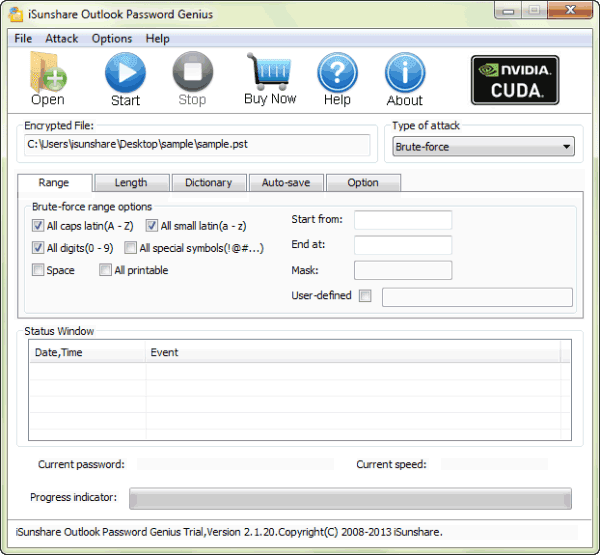
Step 2: Click "Open" button to import outlook file.
Click "Open" button and then browse encrypted outlook file in computer. When find it out, open it. It would appear in "Encrypted File" box.
Step 3: Select appropriate password attack type and make settings.
Password attack types are provided in the drop-down box of "Type of attack". Browse and select one suitable.
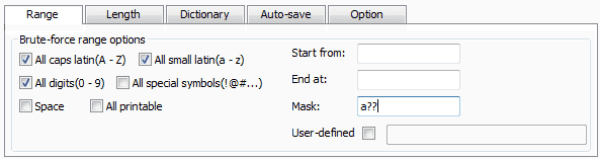
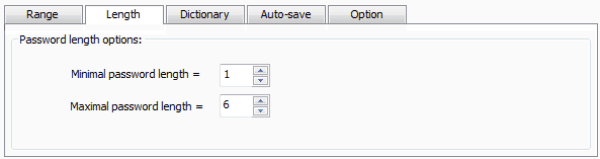
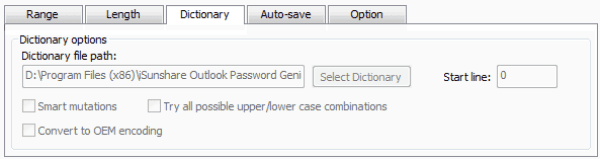
For example, if you remember part of outlook password, select Mask attack, and set "Mask" parameter. If you donÕt have any information about password, select Brute-forceattack, and then set password range and length for it. If the password for outlook file is regular, also could choose "Dictionary" and select "Dictionary file path" or confirm default path.
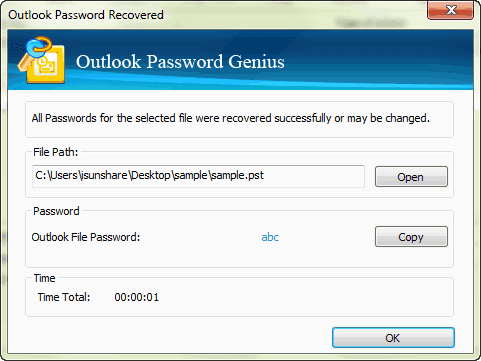
Step 4: Click "Start" button to recover outlook password.
How to open encrypted Outlook data file?
After you get outlook password in pop-up window, copy it and you could open Outlook data file in Microsoft Outlook. But please save outlook password in safe place.
Could you open encrypted outlook data file when dont know password? Surely the answer is yes.
Video about how to open password protected Outlook files in Microsoft Outlook:
http://www.dailymotion.com/video/x1oxjgh_how-to-open-password-protected-files-in-microsoft-outlook_news
Go to link Download
Subscribe to:
Posts (Atom)