Showing posts with label break. Show all posts
Showing posts with label break. Show all posts
Thursday, May 18, 2017
Break Pettren Lock For Android Mobile By Masti Computer
Break Pettren Lock For Android Mobile By Masti Computer

Lets Start.....
1.First of All ,Remove Memory Card and Power off Your Mobile or Tablet.
2.Hold Volume Buttons and Press Power Buton.

3.Move Cursor on "Restore" or "Factory Reset" and Press Power Button.
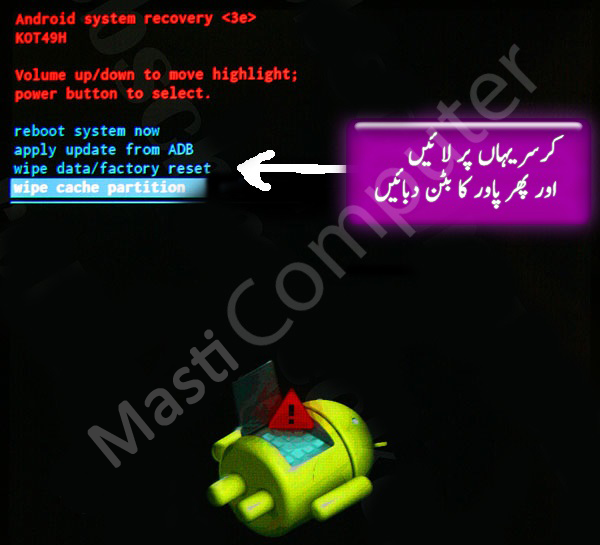
4. Your Mobile going to Power off and will Restart soon.
5.Just Wait Sometime and then Complete Your desired information.

Break Pettren Lock For Android Mobile Powered By Masti Computer and More Tips&Tricks ,Free Software,Computer Course Like Our Facebook Page.
Go to link Download

Thursday, March 30, 2017
How to Break Windows 7 Password for Computer Administrator
How to Break Windows 7 Password for Computer Administrator

You now can troubleshoot the problemÑcomputer Windows 7 password forgotten!
One of the worst things that a computer user can run into is forgetting their computer login password. For example, when you forgot Windows 7 password, then you probably cannot log in to your account or access the files on your Win 7 machine. Thankfully, now you can regain your forgotten pc password without losing any data from your computer. In this article, I will take Windows 7 computer for instance to show you break Windows 7 password easily when you forgot it.
Step-by-step guides on how to break lost Windows 7 password
Over the past few decades, weÕve seen much technological advancement especially in the field of computer hardware and software. This makes it possible for us to solve some problems which seem impossible to be fixed such as fixing the locked Windows 7 due to its login password being locked. Now, letÕs experience this new technology together!
Break Windows 7 admin password with Windows Password Recovery Basic
Yes, Windows Password Recovery Basic represents the new technology in breaking forgotten Windows password. Easy operation, brief and simple interface and quick password recovery speed make this apps available and popular to many computer users. HereÕs how Windows Password Recovery Basic works on Windows 7 Password bypass.
- Step1. Download and launch Windows Password Recovery Basic.
You need first download this app to an accessible computer, and then install it quickly. After installation, click the icon on desktop to launch it. - Step2. Burn a Windows 7 password reset disk.
First insert a blank CD/DVD to the accessible computer and later click the ÒCD/DVDÓ option on the interface. After that, you can click ÒBurnÓ to start burning. Once the burning process finishes, take the CD/DVD out of the PC, thus a Windows 7 password reset disk has been made successfully. - Step3. Start to break a Windows 7 administrator password with the burned disk.
Now insert the burned disk to the target/locked Windows 7 computer. Then start the PC and set it boot from CD-ROM in BIOS. After the BIOS settings done, restart the PC. When the PC boots, you will find the windows screen is not the exact Windows 7 screen, but it is the interface of Windows Password Recovery Basic. Next, you can follow the easy wizard on the interface to crack Windows 7 password step by step, and the whole process wonÕt ask you more than 3 clicks of mouse.
About 1 or 2 minutes later, you then can successfully log into that account without a password. IsnÕt Windows Password Recovery Basic a powerful Windows 7 password reset tool? The more important thing is that such tool cannot only break Windows 7 administrator password, but can bypass passwords for all versions of Windows operating systems.
Article Source: http://www.windowspasswordrecovery.net/article/break-windows-7-password.html
Go to link Download
Tuesday, November 29, 2016
How to Break Administrator Password in Windows 7 without Login
How to Break Administrator Password in Windows 7 without Login
Lost or forgot Windows 7 password and locked out of Windows 7 computer. Take it easy, here we can learn how to fix Windows 7 password break without login. See more details as below.
How to use Windows Password Key to break Windows 7 administrator password in easy way
Windows Password Key is the Windows password remove tool that main at Windows lost or forgot password recovery. Also we can use that tool to break Windows 7 administrator password in only 3 steps. See more details as below.
Step1: Download and install Windows Password Key on any accessible computer.
Step2: Using a CD/DVD or USB to burn Windows Password Key on it, then insert the newly created disk to Windows 7 computer that you lost or forgot password.
Step3: Choosing the account that you need to recover password, after that, restart your Windows 7 computer.
After only 3 simple steps, your Windows 7 administrator password has recovereysuccessfully.
How to use Windows Password Key to break Windows 7 administrator password in easy way
Windows Password Key is the Windows password remove tool that main at Windows lost or forgot password recovery. Also we can use that tool to break Windows 7 administrator password in only 3 steps. See more details as below.
Step1: Download and install Windows Password Key on any accessible computer.
Step2: Using a CD/DVD or USB to burn Windows Password Key on it, then insert the newly created disk to Windows 7 computer that you lost or forgot password.
Step3: Choosing the account that you need to recover password, after that, restart your Windows 7 computer.
After only 3 simple steps, your Windows 7 administrator password has recovereysuccessfully.

Refer to the following method to break Windows 7 administrator password
Method one:
Step1: If the computer boots to the Welcome screen when I saw the prompt box appears, enter your user name and password, press CTRL + ALT + DELETE, the account window will pop up, enter the user name: administrator, then press enter.
Step2: If the administrator account has a password, then Windows 7 system press F8 when starting, select "safe mode with command line", then select "Administrator" and then pops up the "Command Prompt" window, enter the following code (ASD represents the newly added system administrator account name, according to the individual set):
User: NET user
L administrator: net localgroup administrators.
Step3: Then restart the computer, select ASD after user enters, followed by enters "control panel--------user account forgotten password-do-delete key."
Method two:
Step1: Because the cmd in the system directory, file changes must first take ownership of a file. Method is: open "C:/" (assumed Windows 7 system is installation in e disc, then mouse right hit "Narrator.exe", followed by select "permission"-senior--owner ", will current Windows 7 Xia administrator account set for owner (if in list no current account words, on click" other account ", manual entered current account name), click" determine "returns permission set window, click" added "button, The current administrator account to add to the list, and setting account read permissions on the file to "full control";
Step2: Then continued with the same steps above, set the current account on "cmd.exe" permissions to full control, and then "Narrator.exe" renamed to "narrator1.exe", "cmd.exe" renamed to "Narrator.exe";

Step3: And (if is to administrator account login of on without this a step has) heavy Kai login Windows7, in login interface click right Xia angle of "easily access" button, in open of window hook selected "started tells people" option, at started of is cmd window has (is to System identity opened of, so natural has administrator permission), then in cmd entered following of command opened administrator account, Can be used to restart the administrator: the net it is forced open the net user administrator account that is forcing the user administrator password to 123456;
Step4: The administrator account is not available, then create a new one and administrator permissions of the user, and then log on again to restart the Windows7, in the login screen, click the lower right corner of the "ease of access" button in the open window check the "Start Narrator", start the cmd window, type: NET user admin return; net localgroupa administratorsÕ Carriage return;
Step5: Finally, restart your computer, access the Admin account you can boot.
That method is much complex for me to understand, you can choose which method is much better for you.
After reading that, have you got how to break administrator password in Windows 7 without login in easy way? If not, you can read again. Good luck to you.
Go to link Download
Subscribe to:
Posts (Atom)