Showing posts with label tablet. Show all posts
Showing posts with label tablet. Show all posts
Tuesday, February 28, 2017
Six Options to Sign in Locked Windows 10 PC Laptop Tablet
Six Options to Sign in Locked Windows 10 PC Laptop Tablet
When windows 10 login password forgot or lost, how can you sign in Windows 10? Now the article summarizes six options you can choose to login Windows 10 before or after resetting Windows 10 login password?
Before resetting Windows 10 password, three sign-in options are available if you have them before locked out of Windows 10 computer.
- PIN code or picture password for Windows 10 login user.
- Another local admin account. If there is, it should appear at the bottom of Windows 10 logon screen. Just choose it and type password to enter Windows 10.
- Built-in Administrator. Unless you have enabled it, it would not be available for Windows 10 logon.

After resetting Windows 10 password, you would get more three options to sign in Windows 10 PC/laptop/tablet.
- Sign in Windows 10 without password.
- Access Windows 10 with login user and new password.
- Login Windows 10 with new administrator.
But how can we create new Windows 10 sign-in options and how to login into Windows 10 after password reset? This is a question worth to considering sincerely, especially while Windows user has no PIN code or picture password, and another administrator, and built-in administrator has not been enabled.
Now the follow three ways would answer this question about creating new Windows 10 sign-in options. And while you have no choices without resetting windows 10 password, you could only use ways below if you want to sign in Windows 10.
1. Password Reset Wizard. If password reset disk has been created, you can click "Reset Password" on Windows logon screen after typing wrong password, to run Password Reset Wizard to reset Windows 10 forgotten password. Then sign in Windows 10 without password or new password.

2. Windows password recovery tool, which can create reset disk and remove forgotten password, create new administrator, so you can sign in windows 10 without password, with new administrator after using windows password recovery tool.

3. Windows 10 installation CD and command prompt also could reset windows 10 password.
While you reboot windows 10 computer from installation cd, and replace utilman.exe with cmd.exe, you could restart windows 10 and run command prompt to reset windows 10 user password, even though windows 10 computer is locked at that time.

With command, you can remove windows 10 password, reset windows 10 password, create new administrator. So with this way, you can sign in windows 10 without password, new user password or new administrator.
Topics you may be interested:
- Windows 10 Laptop Password Reset with Three Methods
- How to Unlock Windows 10 Admin Password
- Windows 10 Remove Password on Bootup
Go to link Download

Sunday, January 22, 2017
How to Reset Admin Password in Windows 8 1 Tablet
How to Reset Admin Password in Windows 8 1 Tablet
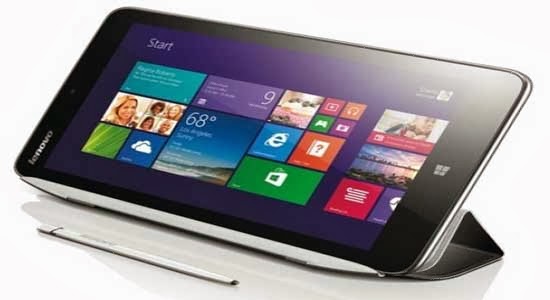 Lost admin password in Windows 8.1 tablet, how to reset it with general methods for common tablets, such as Lenovo Miix2, HP Omni 10, Dell Venue 8 Pro or Venue 11 Pro, Acer Aspire Z3-600, ASUS Transformer Book T100 and Acer Iconia W4 Windows 8.1 tablet?
Is there any way to reset Windows 8.1 tablet admin password easily and effectively? In passage below,three ways will be introduced for Windows 8.1 tablet password reset in my perspective.
Way 1: Make Use of Windows 8.1 Default Administrator Account
If you lost or forgot other administrator password in Windows 8.1, default Windows administrator account without password would be the best way to access Windows 8.1 and help you to reset forgotten or lost other Windows 8.1 admin password.
Selection 1: Change Windows 8.1 password in User Accounts
First, login Windows 8.1 with default administrator. And then turn to Control Panel ÐUser Accounts, choose targeted admin account. In Manage Account window, click "Change the password" button, and type in new password twice to confirm password changed.Tips: Three Ways to Access Control Panel on Windows 8
Selection 2: Enter Windows 8.1 Safe Mode with Default Administrator
From Windows XP to Windows 8, each version of Windows system could entered in safe mode to do some primary system changes in order to protect Windows system safe. But it is disabled in normal mode.
- Press Win + Rto enter Run box and type "msconfig" in the box. And then press Enter button.
- Navigate to boot tab, check "Safe boot". Choose ÒMinimalÓ-normal safe mode, click "Okay" button and restart your computer.
Selection 3: Reset Windows 8.1 tablet password with Command Prompt
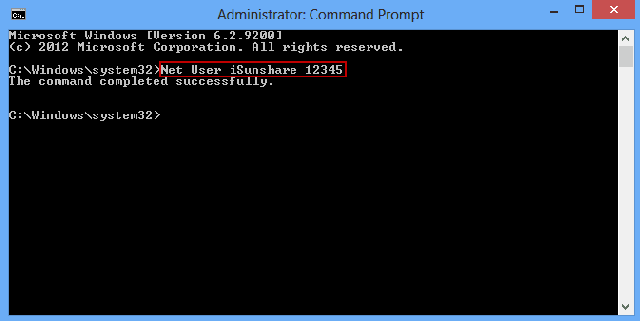 After you login Windows 8.1 tablet with default administrator, press Win + X and choose Command Prompt (Admin) to run.
Type in the command: net user <user name> <user new password>, and press Enter. Instantly, tablet lost admin password would be removed or reset.
Tips:
However, for the sake of computer security, most people have changed the built-in administrator password. If this has happened, the way introduced above would not work. Now turn to the following ways to ask for help.
Way 2: Reset Windows 8.1 Admin Password with Picture Password or PIN
Windows 8.1 is different from other Windows systems, because it provides different kinds of logon ways to access computer besides local user password. Picture password and PIN code are such special login ways provided by Microsoft Windows 8.1. So if you forgot Windows 8.1 password, previously-created picture password or PIN could help you.
- Start your tablet and select targeted user account you want to sign in to Windows 8.1.
- Choose picture password or PIN code to access Windows 8.1.
- Turn to Control Panel and change admin user password.
Way 3: Recover Windows 8.1 Tablet Password with Password Recovery Tool
Password recovery tool, such as Windows Password Genius Advancedalways could help you, no matter which kind of password you lost or how complex your lost admin password is. This is because of password reset disk created with it. If you have created password reset disk on your PC when your PC is accessible, you would know that password reset disk is the most powerful program to recover Windows forgotten password.
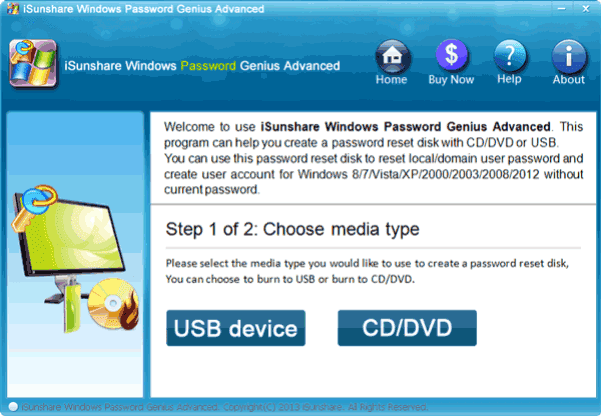
Step 1: Burn a Windows password reset disk with password recovery tool
- Find Windows Password Genius Advanced and accessible computer, bootable USB drive.
- Install Windows password recovery tool in accessible computer and insert bootable USB drive into computer.
- Choose USB flash disk from drop-down box, and click "Begin burning" to create password reset disk.
- Exit USB reset disk after you see "Burning Successfully" message.
Step 2: Reset Windows 8.1 Password with reset disk
Plug USB drive into Windows 8.1 tablet and boot it from USB. When you see Windows Password Genius Advanced program runs in WinPE environment, select Windows 8.1 system and administrator. And then click ÒReset PasswordÓ to remove administrator password.
Is there any other doubt? If you couldnÕt find better ways, Way 3 would be the best choice for you because no matter what password problem you meet, it could help you effectively and safely.