Showing posts with label mail. Show all posts
Showing posts with label mail. Show all posts
Tuesday, April 25, 2017
How to backup Import Microsoft Outlook Mail
How to backup Import Microsoft Outlook Mail

How to backup/Import Microsoft Outlook Mail
Hello friend! How are you? I hope you are very well. Today I am going to show you how to export and import your Microsoft 2010 and 2013 outlook mail (.pst) in your hard drive. If you use Microsoft outlook 2010 or 2013 and if you want to backup or import your mail, you must follow my bellow procedures.
So please letÕs see how to backup or import Microsoft outlook emails.
How to Backup Microsoft outlook 2010/2013 mail?
Open Microsoft outlook. From the left side click on ÒFILEÓmenu. Click ÒOptionsÓ ˆfrom the options window click ÒAdvancedÓ. From the right side click ÒExportÓbutton. Now will open a new wizard which name is ÒImport and Export WizardÓ, from this wizard select ÒExport to a fileÓ then click next. Now select ÒOutlook Data file (.pst)Ó then click ÒNextÓ. Click Next. Now this wizard give you three options, carefully read this three options and select one option which one you want. Personally I select ÒReplace duplicates with items exportedÓ. Now click on ÒBrowseÓbutton and give a location where you want to save your mail. After this click Finishbutton and click Ok. Now it will take sometimes and please wait until finishing this process. After completing this process you work is finished.
How to Import Microsoft outlook 2010/2013 mail?
Open Microsoft outlook. From the left side click on ÒFILEÓmenu. Click ÒOptionsÓ ˆfrom the options window click ÒAdvancedÓ. From the right side click ÒExportÓbutton. Now will open a new wizard which name is ÒImport and Export WizardÓ, from this wizard select ÒImport from another program or fileÓthen click next. Now select ÒOutlook Data file (.pst)Ó then click ÒNextÓ. Now this wizard give you three options, carefully read this three options and select one option which one you want. Personally I select ÒReplace duplicates with items exportedÓ. Now click on ÒBrowseÓbutton and select your outlook (.pst) file and then click Open, which one before you backup. After this click Next and then Finish. Now it will take sometimes and please wait until finishing this process. After completing this process you work is finished.
Thanks to all of my friends. If you think this article is helpful, please share this article with your friends and any social media.
Md. Manjurul Islam (Rubel)
My Facebook, Youtube,
You may like also....
How To Enable .Net Framework On Windows 8/8.1
Solved HP Probook 440/450 G2 Fingerprint Problem
How To Solve Dell Vostro 5470 Fingerprint Problem
How To Install Microsoft .NET Framework On Windows 7
Go to link Download

Saturday, April 1, 2017
How to Recover Data File Password in Outlook E mail
How to Recover Data File Password in Outlook E mail
Microsoft Office Outlook password forgot? CouldnÕt open Outlook PST/OST data file? CouldnÕt access E-mail accounts in Outlook?
Have you encountered these problems? Actually, all of these problems could be solved by one way, recovering Outlook data file password. All of the e-mail accounts added to Outlook and information about e-mails, task and schedule etc are saved in Outlook data file on your local computer, or saved in E-mail server. So just recovering data file password, you would be able to access e-mail in outlook.
Through the search and comparison of different kinds of outlook password recovery tools, Outlook Password Genius is effective one for Outlook data file password recovery. Because it directly imports data file into software, and then recover data file password by password attack.
Have you encountered these problems? Actually, all of these problems could be solved by one way, recovering Outlook data file password. All of the e-mail accounts added to Outlook and information about e-mails, task and schedule etc are saved in Outlook data file on your local computer, or saved in E-mail server. So just recovering data file password, you would be able to access e-mail in outlook.
Through the search and comparison of different kinds of outlook password recovery tools, Outlook Password Genius is effective one for Outlook data file password recovery. Because it directly imports data file into software, and then recover data file password by password attack.
Only three steps and two minutes at most needed. With so high efficiency, letÕs see how to recover Outlook data file password in details?
Step 1: Install Outlook Password Genius on your computer. And click ÒOpenÓ button to import encrypted outlook data file, PST or OST file.
Get it here: http://www.isunshare.com/outlook-password-recovery.html

Step 2: Select password attack type and make settings.
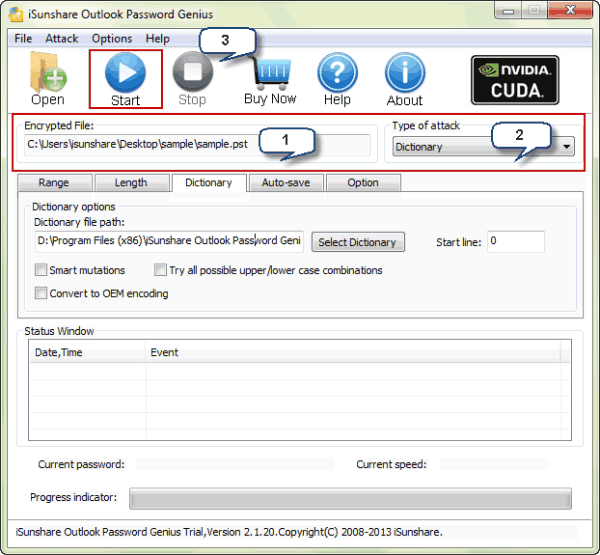
Step 3: Click ÒStartÓ button to recover imported data file password.
In new pop-up window, there is Outlook password recovered. You can copy it to access E-mail in Outlook or save it in safe place.

If you forget not only Outlook data file password, but also other Office password files, such as Word document, Excel sheet, Access database or PowerPoint file, select Office Password Genius to help you. Related Articles:
- How to Recover Different Kinds of Deleted or Damaged Data
- Principles of Hard Disk Data/File Storage and Format
- How to Setup and Delete E-mail Account in Outlook 2010
Go to link Download
Wednesday, December 28, 2016
Daily Mail on top form
Daily Mail on top form
A rising star hedge fund manager won £110million by betting against the pound ahead of BritainÕs vote on the European Union.
James Hanbury, who manages £1.1billion for Odey Asset Management, went against complacency in the rest of the market which assumed Remain would win the historic referendum.
He guessed that Britain might shock the world by voting to Leave Ð and that the value of sterling would plunge as a result. Mr Hanbury, 36, commissioned a private poll which put Remain narrowly ahead.
But he decided to take a risk on the basis there was a lot to gain and little to lose, given the pound might drop massively if Britain quit but was unlikely to rise much higher if it voted to stay.
And the father-of-three, who lives in a £3.4million house in LondonÕs super-rich West Kensington neighbourhood, won big.
Go to link Download
Subscribe to:
Posts (Atom)