Showing posts with label security. Show all posts
Showing posts with label security. Show all posts
Tuesday, May 23, 2017
How to Make Windows 7 Security Settings on UAC
How to Make Windows 7 Security Settings on UAC
Most of us probably have confronted with such situation. That is no matter which kind of user account we login Windows with, system administrator or local standard user, UAC prompting message always pops up when we prepare to install software on Windows 7 or change Windows system settings.
Actually, it protects our computer sometimes, but sometimes it disturbs operations on Windows 7 computer. So some impatient computer users may want to close UAC for convenience directly. However, it is really suitable to close UAC at our will?
It is surely not and it is not necessary. Because compared to Windows Vista, the UAC on Windows 7 has made a progress on work principles and level settings. With the active defense function provided by Windows 7 UAC, malicious software can be forbidden running automatically in the Windows system background. And we can make simple settings on Windows 7 UAC to let it work according to our intention, and protect Windows system at the same time.
Now, letÕs see how to make Windows 7 security settings on UAC step by step.
Step 1: Create Windows User Account on UAC
Step 2: Set Password for User Account on UAC
Step 3: Monitor Computer Usage with Parental Controls
Step 1: Create Windows User Account on UAC
Step 2: Set Password for User Account on UAC
Step 3: Monitor Computer Usage with Parental Controls
Step 1: Create Windows User Account on UAC
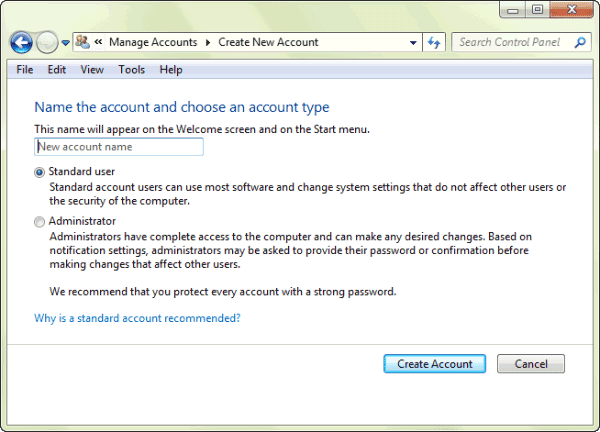
Open Control Panel Ð Add or remove user accounts, and a dialog pops up. Click ÒCreate a new accountÓ. Type a name for user account and choose an account type. At last, click ÒCreate AccountÓ button.
Step 2: Set Password for Windows 7 User Account
Click the Standard User to open User Account control window, and select ÒCreate a passwordÓ. Type new password twice for this user account, and click ÒCreate passwordÓ button.
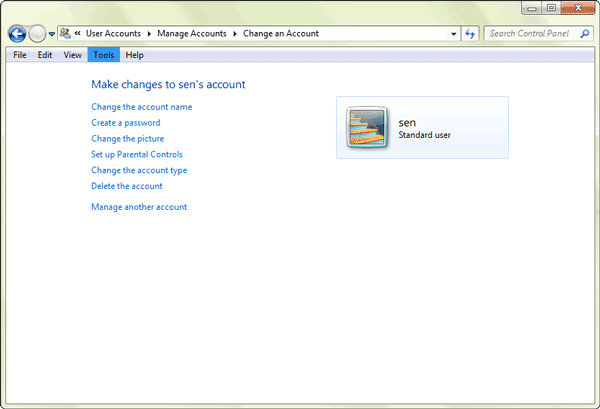
Set password for every account on Windows with this method. And then when we login Windows every time, password would be needed to type in.
Tips: How to Set Windows 7 Password
Tips: How to Set Windows 7 Password
Step 3: Monitor Computer Usage with Parental Controls
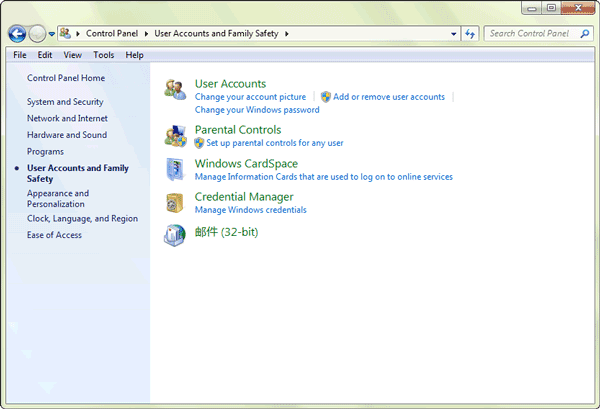
Open Control Panel Ð User Accounts and Family Safety, and click ÒParental ControlsÓ. Select Standard User, and system would prompt you that set password for administrator if you have never set for them. If you have set administrator password, it would directly enter Parental Controls window.
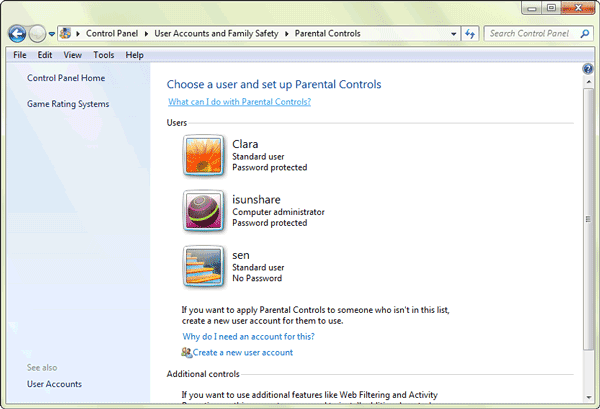
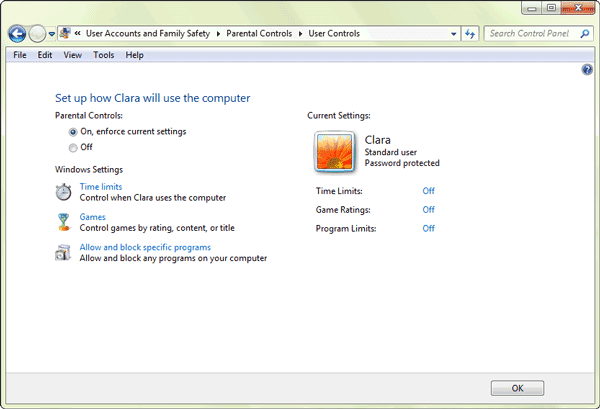
Click ÒTime limitsÓ to open Time Restrictions window, here you could set time when this standard user can or canÕt use computer. At last, click ÒOKÓ to complete user time restrictions settings.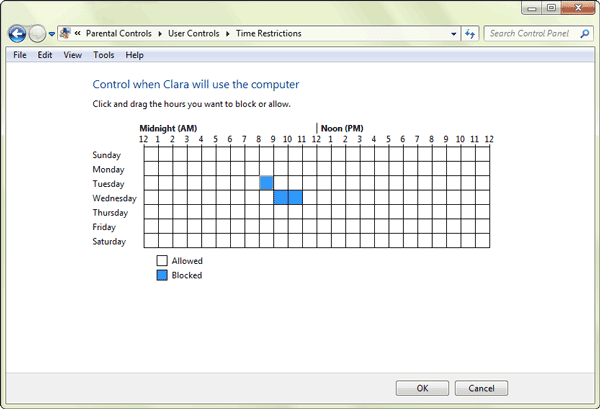
Click ÒAllow and block specific programsÓ, to open Application Restrictions. There are two options for selection. Generally, select Ò* can only use the programs I allowÓ. And tap the programs in the box that you want to set available for this user account. If the programs you want to set available are not listed, click ÒBrowseÓ to add them to this list first and then choose them. At last, click ÒOKÓ to finish setting application restrictions.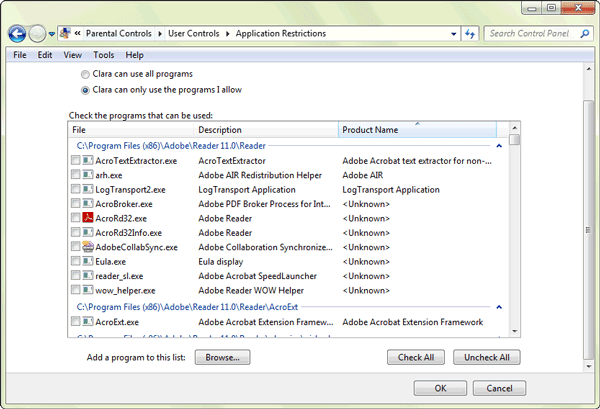
From then on, when this user accesses to Windows 7 and want to run the blocked programs, system will prompt user that ÒParental Controls has forbidden this programÓ. At this time, if this user wants to get privileges to run this program again, please click the button ÒPlease Ask Administrator for PrivilegesÓ and type administrator password to run it.
Tips: How to Lock Apps on PC with Windows 7
From then on, when this user accesses to Windows 7 and want to run the blocked programs, system will prompt user that ÒParental Controls has forbidden this programÓ. At this time, if this user wants to get privileges to run this program again, please click the button ÒPlease Ask Administrator for PrivilegesÓ and type administrator password to run it.
Tips: How to Lock Apps on PC with Windows 7
Besides the usual settings on Windows UAC, there are much more UAC options for Windows 7 security, such as ÒChange User Account SettingsÓ and settings for making UAC filter Windows system file and work for applications only.
1. Change User Account Control Settings:
There are four levels on user account control settings. You can move the slider to one of the levels, in order to choose appropriate control settings.
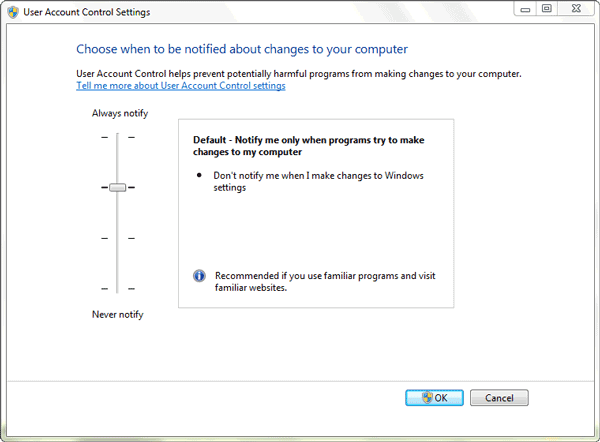
- Always notify me when
- Default Ð Notify me only when programs try to make changes to m computer:
- Notify me only when programs try to make changes to my computer (do not dim my desktop)
- Never notify me when: It is not suggested.
2. Set UAC only work for applications:
Search ÒSecpol.mscÓ in the menu search box in computer, to open Local Security Policy Ð Security Options. Look for ÒUser Account Control: Behavior of the elevation prompt for administrators in Admin Approval ModeÓ in the right side of window.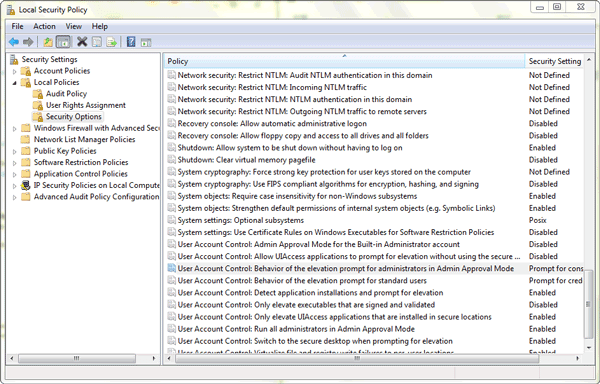
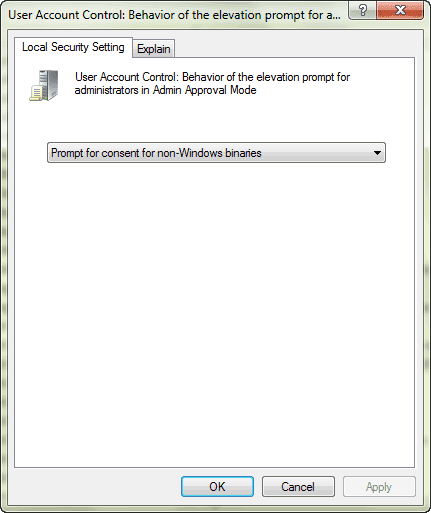 Double click it and six modes are provided. Select one from drop-down box under ÒLocal Security SettingÓ according to your intention. To speak of, the ÒPrompt for consent for non- Windows binariesÓ could filter Windows system file and make UAC only work for applications.
Related Articles:
Related Articles:
- How to Improve Windows 8 Picture Password Security
- Three Major Differences between Windows 8 and Windows 7 Ð Security/Design/Version
- Configure Windows 7 Security Settings and Deployment
Go to link Download

Tuesday, May 2, 2017
PDF Security ActiveX
PDF Security ActiveX

PDF Security ActiveX
Code : 12012-9
DOWNLOAD TRIAL
PURCHASE ORDER
Description : Encrypt and decrypt PDF files
Supports PDF user password and owner password protection
Password protect opening of the PDF document
Disable printing of the PDF document
Disable copying of text/graphics
Disable modifications to PDF the document
Password protection for PDF files with 40 or 128 bit encryption
Examples in VB, ASP, VB Script are provided.
Supports PDF user password and owner password protection
Password protect opening of the PDF document
Disable printing of the PDF document
Disable copying of text/graphics
Disable modifications to PDF the document
Password protection for PDF files with 40 or 128 bit encryption
Examples in VB, ASP, VB Script are provided.
Feature
2013 Internet Security Threat Report Symantec data and analysis on the threat landscape. LEARN MORE. Try & Buy TRIALWARE. An ActiveX control (pdf.ocx) ,About: Adobe¨ Reader¨ software is the free global standard for reliably viewing, printing, and commenting on PDF documents. Its the only PDF file viewer that can ,This is because MSIE uses the Acrobat Control for ActiveX to to display PDF documents. Netscape make sure that its security options recognize the Acrobat Control: ,ActiveX PDF Viewer free download, 100% safe and virus free download from Softonic. ActiveX PDF Viewer free download, download ActiveX PDF Viewer 2.3.5 for free,The patch contains a version of the MSHTML.dll file that turns off Internet Explorer ActiveX functionality, but leaves security fixes intact. (PDF) that can be ,Free download, review of Image, PDF ActiveX Image Viewer CP Pro 3.6 (Viscom Software). Convert multipage TIF to multipage true color PDF.,Internet Explorer ActiveX update that is contained in security update 912812 is Security warning message when you try to open a PDF document from a ,CERT Advisories 1988-2004; CERT Incident Notes 1998-2008; CERT Tech Tips and Papers; A Brief Tour of the Simple Network Management Protocol [2002] (pdf),Powerful and Easy To Use PDF SDK Toolkit. The Foxit PDF SDK ActiveX is ideal for product managers and developers who are either new to PDF or dont want to make large ,Results of the Security in ActiveX Workshop Pittsburgh, Pennsylvania USA August 22-23, 2000 Published at the CERT¨ Coordination Center Software Engineering Institute
Keyword
security
Related Seller
2013 Internet Security Threat Report Symantec data and analysis on the threat landscape. LEARN MORE. Try & Buy TRIALWARE. An ActiveX control (pdf.ocx) ,About: Adobe¨ Reader¨ software is the free global standard for reliably viewing, printing, and commenting on PDF documents. Its the only PDF file viewer that can ,This is because MSIE uses the Acrobat Control for ActiveX to to display PDF documents. Netscape make sure that its security options recognize the Acrobat Control: ,ActiveX PDF Viewer free download, 100% safe and virus free download from Softonic. ActiveX PDF Viewer free download, download ActiveX PDF Viewer 2.3.5 for free,The patch contains a version of the MSHTML.dll file that turns off Internet Explorer ActiveX functionality, but leaves security fixes intact. (PDF) that can be ,Free download, review of Image, PDF ActiveX Image Viewer CP Pro 3.6 (Viscom Software). Convert multipage TIF to multipage true color PDF.,Internet Explorer ActiveX update that is contained in security update 912812 is Security warning message when you try to open a PDF document from a ,CERT Advisories 1988-2004; CERT Incident Notes 1998-2008; CERT Tech Tips and Papers; A Brief Tour of the Simple Network Management Protocol [2002] (pdf),Powerful and Easy To Use PDF SDK Toolkit. The Foxit PDF SDK ActiveX is ideal for product managers and developers who are either new to PDF or dont want to make large ,Results of the Security in ActiveX Workshop Pittsburgh, Pennsylvania USA August 22-23, 2000 Published at the CERT¨ Coordination Center Software Engineering Institute
Search Result
Results of the Security in ActiveX Workshop Pittsburgh ...
Results of the Security in ActiveX Workshop Pittsburgh, Pennsylvania USA August 22-23, 2000 Published at the CERT¨ Coordination Center Software Engineering Institute
Foxit PDF Library SDK ActiveX - Best PDF SDK
Powerful and Easy To Use PDF SDK Toolkit. The Foxit PDF SDK ActiveX is ideal for product managers and developers who are either new to PDF or dont want to make large
Historical CERT Documents - The CERT Program: Anticipating and ...
CERT Advisories 1988-2004; CERT Incident Notes 1998-2008; CERT Tech Tips and Papers; A Brief Tour of the Simple Network Management Protocol [2002] (pdf)
Internet Explorer 6 software update and its effect on ActiveX ...
Internet Explorer ActiveX update that is contained in security update 912812 is Security warning message when you try to open a PDF document from a
Download Image, PDF ActiveX Image Viewer CP Pro - Convert PDF ...
Free download, review of Image, PDF ActiveX Image Viewer CP Pro 3.6 (Viscom Software). Convert multipage TIF to multipage true color PDF.
Internet Explorer ActiveX compatibility patch for Mshtml.dll
The patch contains a version of the MSHTML.dll file that turns off Internet Explorer ActiveX functionality, but leaves security fixes intact. (PDF) that can be
Download ActiveX PDF Viewer - Softonic
ActiveX PDF Viewer free download, 100% safe and virus free download from Softonic. ActiveX PDF Viewer free download, download ActiveX PDF Viewer 2.3.5 for free
PDF Display Problems and Solutions, Information Technology ...
This is because MSIE uses the Acrobat Control for ActiveX to to display PDF documents. Netscape make sure that its security options recognize the Acrobat Control:
Adobe - Adobe Reader download - All versions
About: Adobe¨ Reader¨ software is the free global standard for reliably viewing, printing, and commenting on PDF documents. Its the only PDF file viewer that can
HTTP Acrobat ActiveX Ctrl URI Req BO : Attack Signature ...
2013 Internet Security Threat Report Symantec data and analysis on the threat landscape. LEARN MORE. Try & Buy TRIALWARE. An ActiveX control (pdf.ocx)
Results of the Security in ActiveX Workshop Pittsburgh, Pennsylvania USA August 22-23, 2000 Published at the CERT¨ Coordination Center Software Engineering Institute
Foxit PDF Library SDK ActiveX - Best PDF SDK
Powerful and Easy To Use PDF SDK Toolkit. The Foxit PDF SDK ActiveX is ideal for product managers and developers who are either new to PDF or dont want to make large
Historical CERT Documents - The CERT Program: Anticipating and ...
CERT Advisories 1988-2004; CERT Incident Notes 1998-2008; CERT Tech Tips and Papers; A Brief Tour of the Simple Network Management Protocol [2002] (pdf)
Internet Explorer 6 software update and its effect on ActiveX ...
Internet Explorer ActiveX update that is contained in security update 912812 is Security warning message when you try to open a PDF document from a
Download Image, PDF ActiveX Image Viewer CP Pro - Convert PDF ...
Free download, review of Image, PDF ActiveX Image Viewer CP Pro 3.6 (Viscom Software). Convert multipage TIF to multipage true color PDF.
Internet Explorer ActiveX compatibility patch for Mshtml.dll
The patch contains a version of the MSHTML.dll file that turns off Internet Explorer ActiveX functionality, but leaves security fixes intact. (PDF) that can be
Download ActiveX PDF Viewer - Softonic
ActiveX PDF Viewer free download, 100% safe and virus free download from Softonic. ActiveX PDF Viewer free download, download ActiveX PDF Viewer 2.3.5 for free
PDF Display Problems and Solutions, Information Technology ...
This is because MSIE uses the Acrobat Control for ActiveX to to display PDF documents. Netscape make sure that its security options recognize the Acrobat Control:
Adobe - Adobe Reader download - All versions
About: Adobe¨ Reader¨ software is the free global standard for reliably viewing, printing, and commenting on PDF documents. Its the only PDF file viewer that can
HTTP Acrobat ActiveX Ctrl URI Req BO : Attack Signature ...
2013 Internet Security Threat Report Symantec data and analysis on the threat landscape. LEARN MORE. Try & Buy TRIALWARE. An ActiveX control (pdf.ocx)
Go to link Download
Monday, May 1, 2017
Three Major Differences between Windows 8 and Windows 7 ‰ÛÒ Security Design Version
Three Major Differences between Windows 8 and Windows 7 ‰ÛÒ Security Design Version
I believe you have seen a lot of articles about difference between Windows 8 and Windows 7. Now I summarize three major differences between them. Hope it could make you become more familiar with two present popular Windows operating systems, Windows 8 and Windows 7.
Windows 8 provides four different versions, Windows RT, Windows 8 Standard, Windows 8 Professional and Windows 8 Enterprise. Windows RT is designed for tablet, and other three versions are available for PC
Up to now, a lot of people still think that Windows 8 is the upgrade version of Windows 7. Actually, it is not true. So whatÕs the difference between Windows 8 and Windows 7?
Up to now, a lot of people still think that Windows 8 is the upgrade version of Windows 7. Actually, it is not true. So whatÕs the difference between Windows 8 and Windows 7?
1stDifference: Version difference between Windows 8 and Windows 7
When Windows 7 was released, it is divided into several versions, including Home Premium, Ultimate and Pro. Why Microsoft divides Windows system into so many versions? The most important reason is in order to satisfy computer usersÕ especial demand. Just like the four versions of Windows XP, Microsoft also divides Windows 8 into four versions.
Windows RT will be installed in tablet or PC with ARM processors. And Windows 8 Enterprise is mainly in the face of enterprise and their employees, which bound to a large number of enterprise applications. Therefore, for general computer users, if they want to upgrade Windows 7 to Windows 8, Windows Standard and Pro are the best choice.
2ndDifference: Design Difference between Windows 8 and Windows 7
If you have tried to use Windows 8, you should know design of Windows 8 is so different from previous Windows systems that we may think it should not be Windows OS for computer.
1. Compared to Windows 7, Windows 8 preview keeps the similar layout of the traditional interface.
Status bar of desktop still keeps the Aero Glass Affection. And the default background takes Beta fish into use which couldnÕt show technology period feel.
2. Start button is cancelled in Windows 8 at last.
3. Windows 8 will split the Control sidebar in the left button. And the traditional left button of the desktop will become a quick entrance to Metro surface.
4. Compared with developer preview, the consumer preview of Windows 8 enlarges button in control sidebar, which makes touch-based operation convenient.
5. In Windows 7, the composite keys of Win and Tab let us know about the layout of 3D effect. But in Windows 8 consumer preview, the page switch mode of the keys combination changes.
6. In the design of Ribbon sidebar, Windows 8 consumer preview make options more easy-to-use and rich like Office, at the same time, the developer version will become easier to use too.
7. In Windows 8 consumer preview, when users are ready to delete something, the system will not give users a hint just like Windows 7 to make a final decision. Instead it will be made by Empty Recycle Bin. This improves effect of Windows system.
8. In Windows 8 consumer preview, the label page of external device, such as USB, connecting with computer is similar to Metro UI experience.
9. During the process of copy and paste in Windows 8, computer user could decide suspend the process, which becomes more humanized than in Windows 7.
10. Windows 8 consumer preview improves task manager by integrating simplify with graphicalization.
3rdDifference: Security Difference between Windows 8 and Windows 7
This part mainly talks about 6 more advanced security settings in Windows 8 than Windows 7.
Whatever you think of it, Windows 8 isnÕt just a new interface slapped on top of Windows 7. Windows 8 has seen a lot of security improvements, including an integrated antivirus, an application reputation system, and protection from boot-time rootkits. There are also quite a few low-level security improvements under the hood. Microsoft hasnÕt spelled out all of them, but Windows 8 manages memory in a more secure way and includes features that make security vulnerabilities harder to exploit.
1. Integrated Antivirus
Windows 8 finally includes an integrated antivirus program. ItÕs named Windows Defender, but the interface will be immediately familiar to anyone thatÕs ever used Microsoft Security Essentials Ð this is Microsoft Security Essentials with a new name. You can easily install any other antivirus you prefer and Windows Defender will be automatically disabled if another antivirus is running, but the integrated antivirus is a capable product. Best of all, this ensures that all Windows users will finally have antivirus protection out-of-the-box.
2. Early Launch Anti-Malware
In Windows 8, antivirus products can start earlier in the boot-up process to scan the systemÕs drivers for malware. This helps protect against rootkits that start before the antivirus program and hide from it. Windows Defender starts earlier in the boot process out-of-the-box, and third-party antivirus vendors can also add the Early-Launch Anti-Malware (ELAM) feature to their products.
3. SmartScreen Filter
Previously used only in Internet Explorer, the SmartScreen filter is now implemented at the operating system level. It will be used to scan EXE files you download from Internet Explorer, Mozilla Firefox, Google Chrome, and other programs. When you download and double-click an EXE file, Windows will scan the file and send its signature to MicrosoftÕs servers. If the application is known-good, such as the installer for iTunes, Photoshop, or another popular program, Windows will allow it to run. If itÕs known-bad, perhaps if it contains malware, Windows will prevent it from running. If itÕs new and Windows doesnÕt know what it is, Windows will warn you and allow you to bypass the warning.
This feature should help less-experienced users from downloading and running malicious programs from the Internet. Even new pieces of malware will be detected by the SmartScreen filter as an unknown new program that should be approached with caution.
4. Secure Boot
On new Windows 8 computers that use the UEFI firmware instead of the old-style BIOS, Secure Boot guarantees that only specially signed and approved software can run at boot. On current computers, malware could install a malicious boot loader that loads before the Windows boot loader, starting a boot-level rootkit (or Òboot kitÓ) before Windows even launches. The rootkit could then hide itself from Windows and antivirus software, pulling the strings in the background.
On Intel x86 PCs, youÕll be able to add your own security keys to the UEFI firmware, so you could even have your system boot only secure Linux boot loaders that youÕve signed.
On Intel x86 PCs, youÕll be able to add your own security keys to the UEFI firmware, so you could even have your system boot only secure Linux boot loaders that youÕve signed.
5. Memory Management Improvements
Microsoft has made a lot of under-the-hood improvements to the way Windows 8 manages memory. When a security hole is found, these improvements can make the security hole harder or even impossible to exploit. Some types of exploits that function on earlier versions of Windows wouldnÕt function at all on Windows 8.
Microsoft hasnÕt spelled out all of these improvements, but they have mentioned a few:
Microsoft hasnÕt spelled out all of these improvements, but they have mentioned a few:
- ASLR (Address Space Layout Randomization) has been extended to more parts of Windows, randomly moving data and code around in memory to make it harder to exploit.
- Mitigations that were once applied to Windows applications are now also applied to the Windows kernel.
- The Windows heap, where Windows applications receive their memory from, includes additional checks to defend against exploit techniques.
- Internet Explorer 10 includes improvements that make 75% of the security vulnerabilities reported over the last two years more difficult to exploit.
6. New Apps Are Sandboxed
Apps for Windows 8Õs new Modern interface (formerly known as Metro) are sandboxed and restricted in what they can do on your computer.
On the Windows desktop, applications had full access to your system. If you downloaded and ran a Windows game, it could install drivers on your system, read files from everywhere on your hard drive, and install malware on your computer. Even if programs run with limited credentials thanks to UAC, they typically install with Administrator privileges and can do anything they want during installation.
Windows 8 apps function more like web pages and mobile apps on other popular mobile platforms. When you install an app from the Windows Store, that app has limited access to your system. It canÕt run in the background and monitor all your keystrokes, logging your credit card number and online banking passwords like applications on the traditional Windows desktop can. It doesnÕt have access to every file on your system.
Apps for Windows 8Õs new Modern interface are also available only available through the Windows Store, which is more controversial. However, users canÕt install malicious Modern apps from outside the store. TheyÕd have to go through the Windows Store, where Microsoft has the ability to pull them if theyÕre discovered to be malicious.
On the Windows desktop, applications had full access to your system. If you downloaded and ran a Windows game, it could install drivers on your system, read files from everywhere on your hard drive, and install malware on your computer. Even if programs run with limited credentials thanks to UAC, they typically install with Administrator privileges and can do anything they want during installation.
Windows 8 apps function more like web pages and mobile apps on other popular mobile platforms. When you install an app from the Windows Store, that app has limited access to your system. It canÕt run in the background and monitor all your keystrokes, logging your credit card number and online banking passwords like applications on the traditional Windows desktop can. It doesnÕt have access to every file on your system.
Apps for Windows 8Õs new Modern interface are also available only available through the Windows Store, which is more controversial. However, users canÕt install malicious Modern apps from outside the store. TheyÕd have to go through the Windows Store, where Microsoft has the ability to pull them if theyÕre discovered to be malicious.
Windows 8 is definitely more secure than Windows 7. An integrated antivirus and application reputation system, along with a tamed app ecosystem that replaces the wild-west nature of previous versions of Windows, will probably make the most difference for inexperienced users that may not have ran an antivirus or knew which applications were safe to install on previous versions of Windows. Low-level improvements to the way Windows manages memory will help everyone, even power users.
Security part refers to: 6 Ways Windows 8 is More Secure than Windows 7
Related Articles:
- Windows 8 Security Knowledge Ð What You Should Know
- 10 General Secure Settings Options for Windows 8
- Configure Windows 7 Security Settings and Deployment
- 10 New Features in Windows 8.1
Go to link Download
Thursday, April 27, 2017
How to Improve Windows 8 Picture Password Security
How to Improve Windows 8 Picture Password Security
In order to make new gesture-based password safe for Windows 8 computer like text-based password, we have to improve picture password security. Before talking about how to improve, letÕs see why picture password is easily cracked.
Why Windows 8 picture password can be cracked easily
Setting up a gesture-based password involves choosing a picture from oneÕs Picture Library folder and drawing three points on the image. Windows 8 accepts three kinds of gestures on picture, taps, lines and circles. And Windows 8 subdivides the image into a 100*100 grid and stores the input points as grid coordinates.
1. But users arenÕt very good at selecting random points on their images. They tend to pick common points of interest, such as eyes, faces or discrete objects.
As a result, passwords derived from this constrained set have much less variability than randomly generated passwords. TheyÕre easier to crack.
2. There is no picture-password-strength meter similar to systems that prevent people from choosing weak text-based passwords.
So when computer users have set weak picture password, they still donÕt know.
3. There have been some researchersÕ experimental model and attack framework allowing them to crack 48% of password for previously unseen pictures in one dataset and 24% in another.
Because of wrong password setting method above and incomplete password setting mechanism, Windows 8 picture password would be cracked easily.
How to improve picture password security?
From the above introduction of the reason why Windows 8 gesture-based password is cracked easily, and the analysis of PIN code, character password and picture password in the table below, you could find what you should do to improve Windows 8 picture password security.
Length | 10-digit PIN | Simple a-z character set password | More complex character set password | Multi-gesture picture password |
1 | 10 | 26 | n/a | 2,554 |
2 | 100 | 676 | n/a | 1,581,773 |
3 | 1,000 | 17,576 | 81,120 | 1,155,509,083 |
4 | 10,000 | 456,976 | 4,218,240 | 612,157,353,732 |
5 | 100,000 | 11,881,376 | 182,790,400 | 398,046,621,309,172 |
6 | 1,000,000 | 308,915,776 | 7,128,825,600 | |
7 | 10,000,000 | 8,031,810,176 | 259,489,251,840 | |
8 | 100,000,000 | 208,827,064,576 | 8,995,627,397,120 |
- Microsoft should integrate the researchersÕ PGA attack to inform users of potential number of guessed it would take to access their system.
- Choose one individual picture and portions to make three gestures.
- Take the most complex gesture line to create gestures.
Now there would be 100 million possible lines set on a picture. It will be more difficult to guess out picture password if what you do is based on the above suggestions. That will increase both security and the memorability of the password.
But in a word, before appearance of better password setting mechanism, gesture-based password had better be another way to access Windows 8. If we want to protect Windows 8 better, we should create powerful local user password, or encrypt important data in Windows 8 computer.