Showing posts with label between. Show all posts
Showing posts with label between. Show all posts
Monday, May 1, 2017
Three Major Differences between Windows 8 and Windows 7 ‰ÛÒ Security Design Version
Three Major Differences between Windows 8 and Windows 7 ‰ÛÒ Security Design Version
I believe you have seen a lot of articles about difference between Windows 8 and Windows 7. Now I summarize three major differences between them. Hope it could make you become more familiar with two present popular Windows operating systems, Windows 8 and Windows 7.
Windows 8 provides four different versions, Windows RT, Windows 8 Standard, Windows 8 Professional and Windows 8 Enterprise. Windows RT is designed for tablet, and other three versions are available for PC
Up to now, a lot of people still think that Windows 8 is the upgrade version of Windows 7. Actually, it is not true. So whatÕs the difference between Windows 8 and Windows 7?
Up to now, a lot of people still think that Windows 8 is the upgrade version of Windows 7. Actually, it is not true. So whatÕs the difference between Windows 8 and Windows 7?
1stDifference: Version difference between Windows 8 and Windows 7
When Windows 7 was released, it is divided into several versions, including Home Premium, Ultimate and Pro. Why Microsoft divides Windows system into so many versions? The most important reason is in order to satisfy computer usersÕ especial demand. Just like the four versions of Windows XP, Microsoft also divides Windows 8 into four versions.
Windows RT will be installed in tablet or PC with ARM processors. And Windows 8 Enterprise is mainly in the face of enterprise and their employees, which bound to a large number of enterprise applications. Therefore, for general computer users, if they want to upgrade Windows 7 to Windows 8, Windows Standard and Pro are the best choice.
2ndDifference: Design Difference between Windows 8 and Windows 7
If you have tried to use Windows 8, you should know design of Windows 8 is so different from previous Windows systems that we may think it should not be Windows OS for computer.
1. Compared to Windows 7, Windows 8 preview keeps the similar layout of the traditional interface.
Status bar of desktop still keeps the Aero Glass Affection. And the default background takes Beta fish into use which couldnÕt show technology period feel.
2. Start button is cancelled in Windows 8 at last.
3. Windows 8 will split the Control sidebar in the left button. And the traditional left button of the desktop will become a quick entrance to Metro surface.
4. Compared with developer preview, the consumer preview of Windows 8 enlarges button in control sidebar, which makes touch-based operation convenient.
5. In Windows 7, the composite keys of Win and Tab let us know about the layout of 3D effect. But in Windows 8 consumer preview, the page switch mode of the keys combination changes.
6. In the design of Ribbon sidebar, Windows 8 consumer preview make options more easy-to-use and rich like Office, at the same time, the developer version will become easier to use too.
7. In Windows 8 consumer preview, when users are ready to delete something, the system will not give users a hint just like Windows 7 to make a final decision. Instead it will be made by Empty Recycle Bin. This improves effect of Windows system.
8. In Windows 8 consumer preview, the label page of external device, such as USB, connecting with computer is similar to Metro UI experience.
9. During the process of copy and paste in Windows 8, computer user could decide suspend the process, which becomes more humanized than in Windows 7.
10. Windows 8 consumer preview improves task manager by integrating simplify with graphicalization.
3rdDifference: Security Difference between Windows 8 and Windows 7
This part mainly talks about 6 more advanced security settings in Windows 8 than Windows 7.
Whatever you think of it, Windows 8 isnÕt just a new interface slapped on top of Windows 7. Windows 8 has seen a lot of security improvements, including an integrated antivirus, an application reputation system, and protection from boot-time rootkits. There are also quite a few low-level security improvements under the hood. Microsoft hasnÕt spelled out all of them, but Windows 8 manages memory in a more secure way and includes features that make security vulnerabilities harder to exploit.
1. Integrated Antivirus
Windows 8 finally includes an integrated antivirus program. ItÕs named Windows Defender, but the interface will be immediately familiar to anyone thatÕs ever used Microsoft Security Essentials Ð this is Microsoft Security Essentials with a new name. You can easily install any other antivirus you prefer and Windows Defender will be automatically disabled if another antivirus is running, but the integrated antivirus is a capable product. Best of all, this ensures that all Windows users will finally have antivirus protection out-of-the-box.
2. Early Launch Anti-Malware
In Windows 8, antivirus products can start earlier in the boot-up process to scan the systemÕs drivers for malware. This helps protect against rootkits that start before the antivirus program and hide from it. Windows Defender starts earlier in the boot process out-of-the-box, and third-party antivirus vendors can also add the Early-Launch Anti-Malware (ELAM) feature to their products.
3. SmartScreen Filter
Previously used only in Internet Explorer, the SmartScreen filter is now implemented at the operating system level. It will be used to scan EXE files you download from Internet Explorer, Mozilla Firefox, Google Chrome, and other programs. When you download and double-click an EXE file, Windows will scan the file and send its signature to MicrosoftÕs servers. If the application is known-good, such as the installer for iTunes, Photoshop, or another popular program, Windows will allow it to run. If itÕs known-bad, perhaps if it contains malware, Windows will prevent it from running. If itÕs new and Windows doesnÕt know what it is, Windows will warn you and allow you to bypass the warning.
This feature should help less-experienced users from downloading and running malicious programs from the Internet. Even new pieces of malware will be detected by the SmartScreen filter as an unknown new program that should be approached with caution.
4. Secure Boot
On new Windows 8 computers that use the UEFI firmware instead of the old-style BIOS, Secure Boot guarantees that only specially signed and approved software can run at boot. On current computers, malware could install a malicious boot loader that loads before the Windows boot loader, starting a boot-level rootkit (or Òboot kitÓ) before Windows even launches. The rootkit could then hide itself from Windows and antivirus software, pulling the strings in the background.
On Intel x86 PCs, youÕll be able to add your own security keys to the UEFI firmware, so you could even have your system boot only secure Linux boot loaders that youÕve signed.
On Intel x86 PCs, youÕll be able to add your own security keys to the UEFI firmware, so you could even have your system boot only secure Linux boot loaders that youÕve signed.
5. Memory Management Improvements
Microsoft has made a lot of under-the-hood improvements to the way Windows 8 manages memory. When a security hole is found, these improvements can make the security hole harder or even impossible to exploit. Some types of exploits that function on earlier versions of Windows wouldnÕt function at all on Windows 8.
Microsoft hasnÕt spelled out all of these improvements, but they have mentioned a few:
Microsoft hasnÕt spelled out all of these improvements, but they have mentioned a few:
- ASLR (Address Space Layout Randomization) has been extended to more parts of Windows, randomly moving data and code around in memory to make it harder to exploit.
- Mitigations that were once applied to Windows applications are now also applied to the Windows kernel.
- The Windows heap, where Windows applications receive their memory from, includes additional checks to defend against exploit techniques.
- Internet Explorer 10 includes improvements that make 75% of the security vulnerabilities reported over the last two years more difficult to exploit.
6. New Apps Are Sandboxed
Apps for Windows 8Õs new Modern interface (formerly known as Metro) are sandboxed and restricted in what they can do on your computer.
On the Windows desktop, applications had full access to your system. If you downloaded and ran a Windows game, it could install drivers on your system, read files from everywhere on your hard drive, and install malware on your computer. Even if programs run with limited credentials thanks to UAC, they typically install with Administrator privileges and can do anything they want during installation.
Windows 8 apps function more like web pages and mobile apps on other popular mobile platforms. When you install an app from the Windows Store, that app has limited access to your system. It canÕt run in the background and monitor all your keystrokes, logging your credit card number and online banking passwords like applications on the traditional Windows desktop can. It doesnÕt have access to every file on your system.
Apps for Windows 8Õs new Modern interface are also available only available through the Windows Store, which is more controversial. However, users canÕt install malicious Modern apps from outside the store. TheyÕd have to go through the Windows Store, where Microsoft has the ability to pull them if theyÕre discovered to be malicious.
On the Windows desktop, applications had full access to your system. If you downloaded and ran a Windows game, it could install drivers on your system, read files from everywhere on your hard drive, and install malware on your computer. Even if programs run with limited credentials thanks to UAC, they typically install with Administrator privileges and can do anything they want during installation.
Windows 8 apps function more like web pages and mobile apps on other popular mobile platforms. When you install an app from the Windows Store, that app has limited access to your system. It canÕt run in the background and monitor all your keystrokes, logging your credit card number and online banking passwords like applications on the traditional Windows desktop can. It doesnÕt have access to every file on your system.
Apps for Windows 8Õs new Modern interface are also available only available through the Windows Store, which is more controversial. However, users canÕt install malicious Modern apps from outside the store. TheyÕd have to go through the Windows Store, where Microsoft has the ability to pull them if theyÕre discovered to be malicious.
Windows 8 is definitely more secure than Windows 7. An integrated antivirus and application reputation system, along with a tamed app ecosystem that replaces the wild-west nature of previous versions of Windows, will probably make the most difference for inexperienced users that may not have ran an antivirus or knew which applications were safe to install on previous versions of Windows. Low-level improvements to the way Windows manages memory will help everyone, even power users.
Security part refers to: 6 Ways Windows 8 is More Secure than Windows 7
Related Articles:
- Windows 8 Security Knowledge Ð What You Should Know
- 10 General Secure Settings Options for Windows 8
- Configure Windows 7 Security Settings and Deployment
- 10 New Features in Windows 8.1
Go to link Download

Friday, February 24, 2017
Difference and Relationship between BIOS and CMOS
Difference and Relationship between BIOS and CMOS
Because of the tight relationship between BIOS and CMOS, they are recognized as the same program at most of time, just their name are different. Actually, they are different two things which are related with each other. So what is BIOS, CMOS? And what are the difference and relationship between BIOS and CMOS?
One: Concept Difference between BIOS and CMOS
CMOS is Complementary Metal Oxide Semiconductor. Because of its characteristics of the read and write, CMOS is used to save data about computer parameters set in BIOS program on motherboard. So its main function is save data.
BIOS is one EPROM or EEPROM chip on computer motherboard. BIOS Setup program is stored in it, which saves important system information and system parameter.
Actually, BIOS is Basic Input-Output system in microcomputer, whose content is integrated in a chip on microcomputer motherboard. The most important input and output program of microcomputer, system information setup, POST and bootstrap program are saved there.
Two: Main Function Difference between BIOS and CMOS
CMOS main function:
1. Quick Power On Self - Test
When computer is starting, motherboard will take a series check and test on systems and peripheral devices. If you set it Enabled, computer startup speed will improve.
2. Boot Up Floppy - Seek
2. Boot Up Floppy - Seek
When computer is starting, BIOS will check whether Floppy is available. If you choose Enabled, when BIOS find no floppy, it will prompt you that is wrong.
3. Boot Up NumLock Ð Status
3. Boot Up NumLock Ð Status
Generally, the small keyboard in the right side of big keyboard is used as number keys default. If it is necessary, you can set it OFF, and small keyboard would become direction keys.
4. Security Option
4. Security Option
There are two options between Security Option, if you set it as ÒSetupÓ, no password is needed to login computer, but password is needed to enter CMOS, which is set before. And only supervisor password could change parameters for CMOS. If you set it as ÒSystemÓ, you will need computer logon password, and only supervisor password could modify CMOS.
How to set password in CMOS?
Two kinds of password settings are provided in CMOS for user, Supervisor/User Password). Follow the below:
- Choose Supervisor Password on main interface, press Enter and ÒEnter Password:Ó appears.
- The length of password could not be longer than 8 characters. When you finish typing it, press Enter.
- Confirm Passwordnow. Type password you just input and press Enter to make sure.
Tips: When you set Security Option as ÒSystemÓ, you can type one of Supervisor password or User password to access Windows computer. And please remember back to main interface and press F10 and Enter to save these changes.
BIOS main function
1. BIOS Interrupt Service Program
It is a programmable interface between software and hardware in microcomputer system. It makes application software functions appropriate link up to microcomputer hardware. The management on floppy, disk, CD-ROM, keyboard, displayer is based on BIOS system interrupt service program. And computer operator could call this program directly by accessing break point, such as INT5 and INT13 etc.
2. BIOS System Setup Program
This program is used to set parameters for CMOSRAM. Just press boot key when you start computer and you will enter this program. And this process to set parameters for CMOS is also called BIOS settings.
3. Electricity Self-Inspection Programs on the POST
When microcomputer is connected with power, POST will check equipment inside system. Once there is problem in check process, system prompt message will pops up for computer user.
4. BIOS System Bootstrap Program
After system POST completes, ROMBIOS will search for soft and hard disk drive, CD-ROM, Network Server according to setup sequence saved in CMOS settings. Read operational system boot record and give control privilege to boot record. Boot record will let system boot successfully.
Relationship between BIOS and CMOS
From the above introduction, you can see BIOS and CMOS is inseparable. We have to set up CMOS through BIOS setup program, and BIOS information is stored in CMOS. So at most of time, we usually called CMOS setting as BIOS setting. Both of them are settings on computer hard ware. And setting parameters are saved in CMOS chip.
Related Articles:
How to Set and Cancel BIOS Password for DELL Laptop
How to Set HP BIOS Password for Desktop and Notebook
Go to link Download
Sunday, October 23, 2016
How to Change Windows 8 Logon Way between Local Account and Microsoft Account
How to Change Windows 8 Logon Way between Local Account and Microsoft Account
Different from previous Windows operational systems, there are two main kinds of ways to login in to Windows 8, local accounts and Microsoft account.
Microsoft account is the special characteristic for Windows 8 and Windows 8.1. With it, computer user could access data and files in Windows 8 remotely. And just because of this feature, one more way is available for Windows 8 password reset.
Now this passage mainly introduces how to change Windows 8 logon way between local account and Microsoft account.
- Change Windows 8 logon way in Start Screen
- Change Windows 8 logon way in Change PC Settings
1. Change Windows 8 logon way in Start Screen
On Start Screen, you could see your account just singing into Windows 8. Click it and choose ÒSign outÓ option to turn to logon screen. Choose local user account or Microsoft account you want to login in to Windows 8 with.
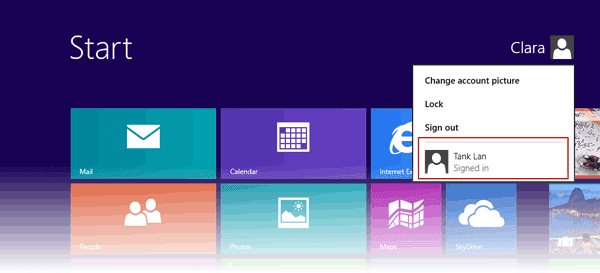 For example, you change Windows 8 logon way from local user account to Microsoft account. Choose Microsoft account, generally taken with email address. Type in password and click OK.
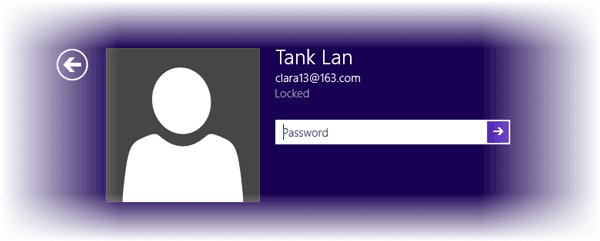
2. Change Windows 8 logon way in Change PC Settings
Move the mouse to the right-upper side of window, choose Settings and select ÒChange PC SettingsÓ at the bottom side of window. On the PC settings window, click Users, you would see which kind of account you have used to login into Windows 8.
If you have signed in to Windows 8 with Microsoft account, there will be an option ÒSwitch to a local accountÓ.
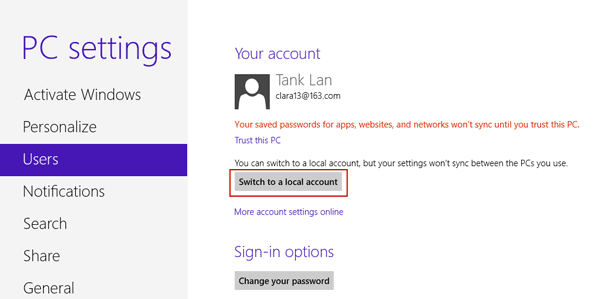
Click it and a window pops up. Current account password has to be typed in.
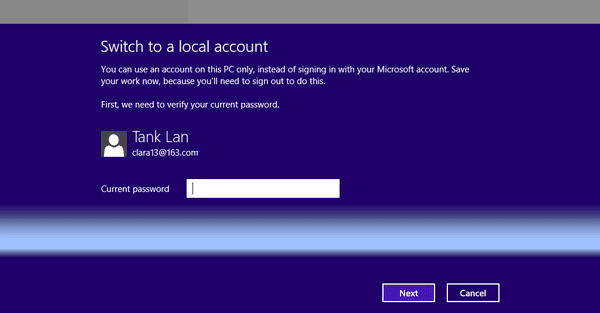
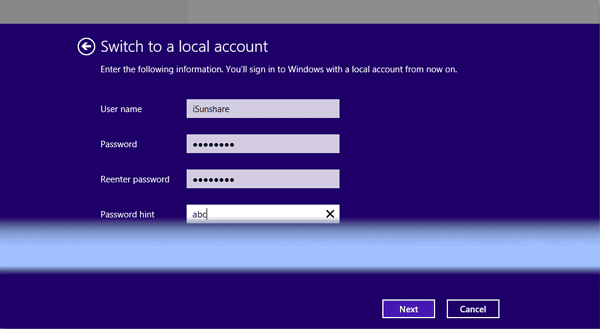
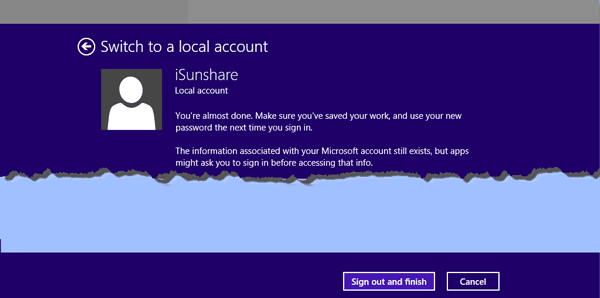
A new window pops up, and user name and password are needed. At this time, you have to create new local account actually.
- Four ways to create Windows 8 logon password and how to use
- How to enable or disable Windows 8 admin account
- How to enter Windows 8 safe mode with four effective ways
- How to find administrator password in Windows 8/8.1 laptop
- How to login into Windows computer with default administrator
- Change domain administrator password Windows server 2012 r2