Showing posts with label shortcut. Show all posts
Showing posts with label shortcut. Show all posts
Sunday, March 12, 2017
Lock Your Computer Screen By Creating A Shortcut
Lock Your Computer Screen By Creating A Shortcut
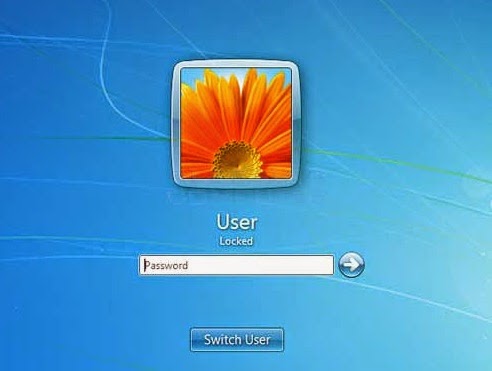 Hello friend!
How are you? Hope you are very well. For locking the computer screen we use two options (logoff and sleep). Today I am going to show you an easy way how to lock your computer, creating by a shortcut.
Anyway if you want to know this tricks, please follow my proceduresÉÉ
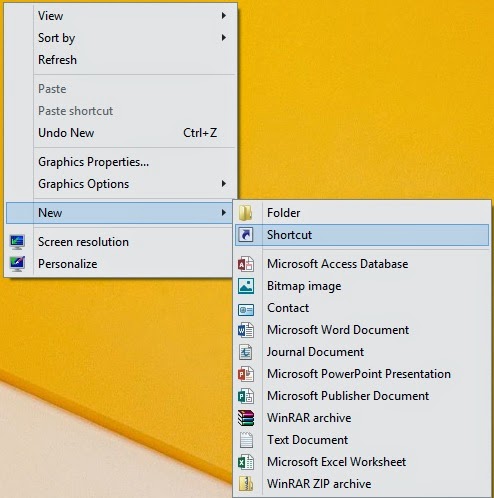
Right click on your desktop --> From the New --> Click Shortcut. Now will open a new window like the bellow image.
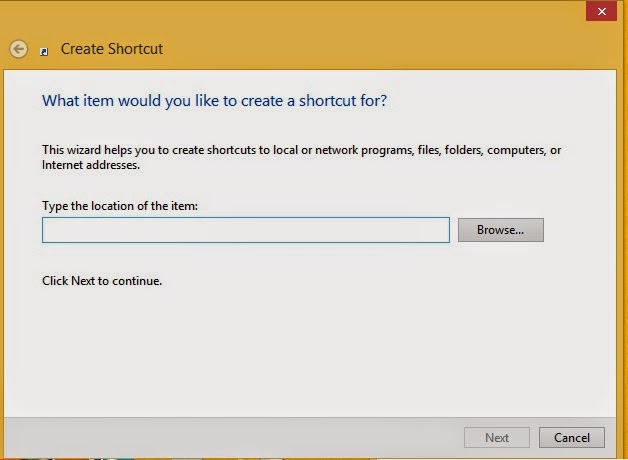
Now type this code in the Òrundll32 user32.dll,LockWorkStationÓ then click next. Type the name of this shortcut (ItÕs not necessary, you can use default name) then click finish.
Your work is finished. Now double click on your created file and look your computer screen is locked.
Video Of This Tutorial:
If you think this article is helpful for you please share with your friends.
Thanks to all of my friends,
Md. Manjurul Islam (Rubel)
You may like also.....
How to Protect Your Secret Files From Others
How To Create Password On Windows 8.1
How to backup/Import Microsoft Outlook Mail
Go to link Download

Tuesday, March 7, 2017
Cara Hapus Virus Shortcut Flashdisk Melalui Command Prompt
Cara Hapus Virus Shortcut Flashdisk Melalui Command Prompt
Cara menghapus Virus Shortcut di Flashdisk melalui Command Prompt. Pernah mengalami Virus Shortcut di Flashdisk anda? Virus ini paling sering muncul dan mudah menyebar di komputer terutama saat menghubungkan flashdisk yang terinfeksi virus Shortcut ke PC. Bagi yang sering gantian atau pinjam flashdisk teman, perlu hati-hati dengan virus ini. Tetapi jika sudah terkena berikut cara menghapus Virus Shortcut di Flashdisk melalui Command Prompt.
Langsung saja, cara menghapus virus shortcut di flashdisk adalah sbb:
1. Pastikan komputer anda aman dari virus shortcut, lalu colokkan Flashdisk anda ke komputer. Lalu lihat dimana drive flashdisk anda terbaca (tekan tombol windows + E), ingat jangan klik (buka) drive flashdisk tersebut, agar virus tidak menyebar.
2. Silakan buka command Prompt, caranya bisa dari RUN lalu ketik cmd atau bisa dari Start > all programs > accsessories > command prompt.
3. Ketik dimana Drive flashdisk anda terdeteksi. Misal drive flashdisk terbaca di H maka ketik H
4. Lanjut dengan ketik perintah ini attrib -h -r -s /s /d
5. Enter dan tunggu prosesnya. File yang hilang (hidden) akan terbuka. Selanjutnya hapus semua shortcut yang ada.
Cara atasi memory card corrupt write protected
Cara memperbaiki atasi flashdisk yang tidak bisa diformat
Cara menghapus virus shortcut di flashdisk melalui Command Prompt sudah selesai.
Go to link Download
Saturday, March 4, 2017
How to Remove Shortcut Virus USB By Masti Computer
How to Remove Shortcut Virus USB By Masti Computer

How to Remove Shortcut Virus in USB or Flash Drive With an easy and Latest Trick of 2014-15.By this You Can Clean Your USB From Shortcut With a min Virus Remover tool .By this You Can easily Deleted Virus From Your Pendrive .This is the Best Shortcut virus remover Software and Provides You foolproof Security From Viruses. So lets Start our article.

Steps to Remove Shortcut Virus USB!
You jus have to Download this Few KBs Free Software and to Ran
this Software to Remove this Virus From any Drive of Your Computer.
Click Here To Download

Go to link Download
Subscribe to:
Posts (Atom)