Showing posts with label protect. Show all posts
Showing posts with label protect. Show all posts
Wednesday, April 12, 2017
Protect your Documents Workbooks Presentations by Password !!
Protect your Documents Workbooks Presentations by Password !!

If youre a regular visitor of Marks PC Solution you should notice, weve published lots of tutorials on Microsoft Windows, Microsoft Office and other software. Weve also published many tutorials and tips regarding security issues. You can find those tips by using the search box. Or you can search by categories: Tips n Tricks, Tutorials, Microsoft, Windows, Security etc. Today, I would like to share another tips on security.
Many of you might be familiar with the password protection system of Microsoft Office. If youre working with highly confidential documents, workbooks and presentations (ie. Exam Questions, Online Account Information, Personal Information, Other Secret files), then this is a good idea to encrypt those files by password.
But if you are not acquainted with the password protection system you should go through the whole post. You should know, the different versions of MS Office keeps the password option differently. You will not find it similar in Office 2003, 2007 and 2010. That could be difficult for you to find the password option. Thats why Im gonna discuss about all versions. :)
Note: The procedure is very similar in MS Word, Excel and PowerPoint.
Setting Password in MS Office Documents
Office XP and 2003:
These two versions are almost similar. All the options and tools are located at the same place. Maybe they are different just by color! Lets start -
Open MS Office Document (Word/ Excel/ PowerPoint) > Go to Tools Menu > Select Options > Hit on the Security Tab > Type your Password on Password to Open Box > Hit OK > Save the Document.
Now whenever you will open the document, first you have to enter the password. Then you will be able to access the file.
I apologize for not sharing any image. I dont use 2003 anymore. I have been using Office 2010 for last two years. But this is very easy. You will have no problem to set password in Office 2003. Upgrade to Office 2010 or 2013 to enjoy exiting features!
Office 2007:
You know Office 2007 brings a dramatic change in the interface. Its ribbon interface is absolutely different from Office 2003 or XP. But Office 2010 and 2007 are almost similar except small changes in few options. Okay start -
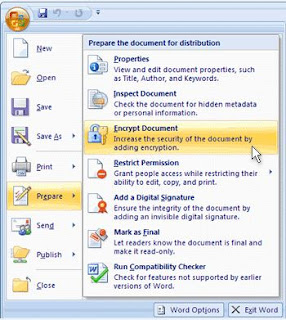
Open any of the Office Programs (Word, Excel or PowerPoint) > Now hit on the Office button from the top left corner > Choose Prepare and then Select Encrypt Document > A small Password box will appear > Type the Password > Hit OK > and then Confirm it > Save the Document.
Look at the image below:
Office 2010:
Though Office 2007 and 2010 are very similar, but there are some significant changes in some of the options. A major change is the disappearance of the Office button. Instead of Office button, you will see the File button in 2010. See how to do -
Open either Word, Excel or PowerPoint file > Click on the File button from the upper-left corner > Choose Info > Hit on the Protect Document from Permission section > Choose Encrypt with Password > Type your desired Password in the box and hit OK > Type again to confirm it > OK > Save the Document.
You can take help of the image below:

Note: If you dont save the document after setting the password, then it will be removed automatically. Password will be enabled after saving the document. And remember, this password has no recovery options as you can do in Gmail, Yahoo or Facebook! So be careful!
Removing/ Changing the Password
Sometimes you may set a password for testing purpose only. For example you set password in a document that doesnt need password at all. And every time youre required to type it when accessing that file. Or maybe you want to change it. But when you try to remove or change that password you cant find any option to remove it. How disgusting! :)
Well this is easier than you think! If you wanna change the password then repeat the whole process again until the password box appears. Then type a different password and save the document.
And if you would like to remove the password then just leave that box blank and save the document. Password will be removed.

Hopefully this post will be helpful for you . . . :)
Go to link Download

Wednesday, March 29, 2017
How To Format Write Protect Usb Flash Drive By Masti Computer
How To Format Write Protect Usb Flash Drive By Masti Computer
 |
| How To Format Write Protect Usb Flash Drive By Masti Computer |
Formatting Write Protected USB is nearly impossible in Microsoft Windows without any third party tool.Universal Serial Bus or USB is Small Device which allows You to Store data in it and carrry it with yourself any where int the world.Normally you will find USB From 4GB to 128GB in size with writing speed of 2MB per second.


Go to link Download
Tuesday, January 31, 2017
How to Protect Your Secret Files From Others
How to Protect Your Secret Files From Others

How are you? Hope you are very well. Everyone have some privacy, have some secret files or important files or documents. We donÕt want to share them with anyone. So we need to protect that files/documents. For this reason we search a powerful software which can protect our secret files.
Today I am going to show you how to protect your documents by protecting your hard drive, without any third-party software. For this procedure you must install windows 7/8 or 8.1.
Anyway if you want to protect your files by protecting your hard drive, please follow my bellow procedures.
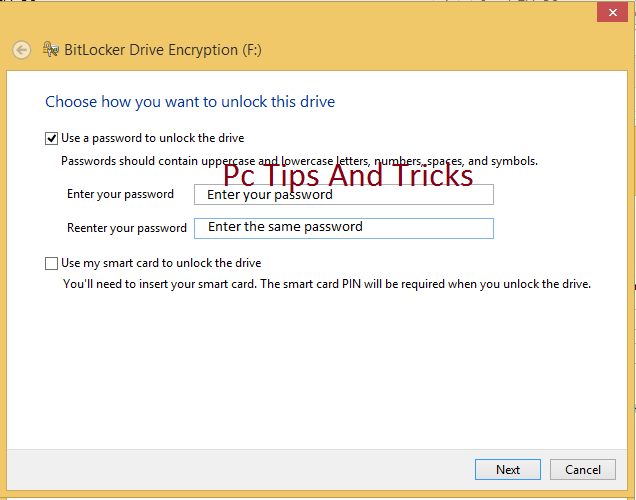
Double click on my computer--> Right click on any drive (Which one you want to protect) --> Click Turn on BitLocker --> Now will open a new window which name is BitLocker Drive Encryption. Check on Use a password to unlock the drive--> now enter your password in the Enter your password box and conform your password in the Reenter your passwordbox. Now this window give you three options.
- Save to your Microsoft account.
- Save to a file.
- Print the recovery key.
Personally I chose Save to a file. Click Save to a file and save this file where you want to save. In feature this file will help you if you forget your BitLocker password. Click Save and click Yes. Click Next and Next. Now click Start Encrypting. Now will start BitLocker Drive Encryption. This process take some times, wait until it finished. After finishing this process your job is done.
Now enjoy yourself ÉÉÉÉÉ
Video Of This Tutorial:
Video Of This Tutorial:
If you like this article and if you think this tricks is helpful, please share this with your friends or share any social media.
Thanks to all of my friends,
Md. Manjurul Islam (Rubel)
You may like also....
How To Install Microsoft .NET Framework On Windows 7
How To Enable .Net Framework On Windows 8/8.1
You may like also....
How To Install Microsoft .NET Framework On Windows 7
How To Enable .Net Framework On Windows 8/8.1
How To Create Password On Windows 8.1
How to backup/Import Microsoft Outlook Mail
Go to link Download
Tuesday, December 6, 2016
6 Tips on How to Protect Your iPhone Data Safe
6 Tips on How to Protect Your iPhone Data Safe
The higher value and more popular the device is, the more dangerous it will be. To some extent, the popularity and high value of iPhone result in the possibility of iPhone stolen or lost. When iPhone is stolen or lost, data on iPhone will be used by others casually if they are not protected with any measures.
So is there any ways or tips to protect iPhone we can do by ourselves? Surely there is, please follow these tips below to keep iPhone data safe.
Tip 1: Create a Complicated Passcode
In iOS 4 and lower version, probably you can only create digital passcode. However, when you are using iOS 4 or supper version, more complicated passcode can be created. For example, alphanumeric password consists of numbers, alpha lower or upper case characters or other characters.
Go to Settings Ð General Ð Touch ID & Passcode, and turn off "Simple Passcode". Type in your iPhone existing passcode now and set a new password for iPhone access.

Tip 2: Use Touch ID If Possible

Touch ID is available in iPhone 6 Plus, 6, 5s and iPad Air 2, iPad Mini 3. It is a new and special way to access iPhone with only your fingerprint. If your iPhone is one of these versions, make full use of it. It can bring you more convenient access to iPhone, and get rid of other people using it. Now you just need to create a Touch ID account.
Tip 3: Turn Find My iPhone on
Find My iPhone is free service for iPhone users to locate lost iPhone and can delete all data and settings on this iPhone.
Therefore, before unfortunate things happen, turn on Find My iPhone is necessary in Settings Ð iCloud with Apple ID.

But this still cannot promise that you can successfully erase iPhone remotely when iPhone is in other peopleÕs hand. Because deleting iPhone data remotely asks for internet connection, and as long as Control Center appearing on lockscreen, another person can disable internet connection.
So when you turn Find My iPhone on, please prevent Control Center from appearing on the top of lockscreen.
Go to Settings Ð Control Center , Turn off Access on Lock Screen.
Tip 4: Encrypt Backup When Sync iPhone to Computer
Why we have to encrypt backup when sync iPhone to computer?
If we have set iPhone synced to computer, iPhone backup will be created automatically when it is connected to computer. However, if we do not encrypt iPhone backup, anyone can access this computer, and easily use this backup without any difficulties. As a result, your iPhone data can be seen clearly in other peopleÕs iPhone.
And if you dont want it happen, just check "Encrypt iPhone backup" or "Encrypt local backup" box in iTunes before you sync iPhone to computer.

And if you dont want it happen, just check "Encrypt iPhone backup" or "Encrypt local backup" box in iTunes before you sync iPhone to computer.
Tip 5: Disable Siri Access from Lockscreen
 Even though you have made alphanumeric password, Touch ID and Find My iPhone enable, made Control Center disable, people still can access iPhone lockscreen by Siri.
 So please disable Siri access from Lockscreen.
Go to Settings Ð General Ð Touch ID and Passcode, type your passcode and click Done. Toggle off Siri under the "Allow Access When Locked" section.
While youre at it, you can also toggle off Passbook access to make sure no one can get to your sensitive information without first unlocking your iPhone.
Tip 6: DonÕt Jailbreak your iPhone
Surely jailbreaking iPhone allows you to customize your iPhone in ways not approved by Apple and install apps that have been rejected in the official App Store. But if you want your iPhone to be secure as possible, stay far away from jailbreaking.
Actually, Apple has designed the secure operating system that runs on the iPhone. If there is no accident, no viruses, malware, or other software-based security threats iPhone like PCs and Android phones. The only viruses that have struck iPhones have targeted jailbroken devices. So, for the security of iPhone, donÕt jailbreaking.
Even though all these settings cannot protect iPhone from using when it is stolen or lost, they are enough for iPhone users to protect their iPhone.
Related Articles:
- Encrypt iTunes Backup | iTunes Backup Password Recovery Tips
- How to Factory Reset iPad with or without iTunes
- Three Ways to Hard Reset iPhone with or without Passcode
- Locked out of iOS 7/8 after Forgot iPhone Passcode
Go to link Download
Friday, October 28, 2016
Password Protect PDF Master
Password Protect PDF Master

Password Protect PDF Master
Code : 29644-5
DOWNLOAD TRIAL
PURCHASE ORDER
Description : Password Protect PDF Master is a powerful, easy to use software for pdf document encryption. With Password Protect PDF Master Software, you can encrypt and convert your pdf document to an exe file, create a password to protect your pdf document, It makes your pdf document more secure.
It encrypts the pdf document with the password you specify, and convert the pdf document to an EXE file which can only be opened when a Read Password is provided by you. It supports password PC Binding, on that mode, you only need to encrypt the pdf document one time, and one password can only be used for one computer, to read the password protected pdf document on other computer, it requires another password to open the password protected pdf document.
It encrypts the pdf document with the password you specify, and convert the pdf document to an EXE file which can only be opened when a Read Password is provided by you. It supports password PC Binding, on that mode, you only need to encrypt the pdf document one time, and one password can only be used for one computer, to read the password protected pdf document on other computer, it requires another password to open the password protected pdf document.
Feature
SmartKey provides you all solutions of password Recovery: Reset and recover password for Windows, Excel, Word, Office, Access, Outlook, PDF, RAR/WinRAR, ZIP/WinZIP ,I need to remove PDF print protection, who can recommend a truly print pdf protection tool?,Password Protect PDF Master is a powerful, easy to use software for pdf document encryption. With Password Protect PDF Master Software, you can encrypt and ,VeryPDF PDF Password Remover is designed to effectively recovery password protected PDF files and remove the restrictions which prevent you from copying, printing ,You can use A-PDF Password Security (free download here) to password protect a PDF, you cen set password and prevent from people copy and paste pdf content, Here is ,Missing master password of PDF files is really crucial concern for PDF users as it restricts users to edit, copy, print etc. To sort out such limitations from locked ,Then your file is protected with a master password! The pdf. Whats New. Version 10.1.1: pdf-Recover decrypt AES 256 R6 - the latest Adobe encryption standard;,With Password Protect PDF Master Software, you can encrypt and convert your pdf document to an exe file, create a password to protect your pdf document, It ,With Password Protect Video Master Software, you can use a password to protect your video and audio files on your computer. It encrypts the video file with the ,Password protect your PDF documents online. Control all aspects of security and set up the PDF layout options too. Easily change the author, title and subject
Keyword
password protect pdf,password protected pdf,how to password protect a pdf,protect pdf with password,how to protect pdf with password
Related Seller
SmartKey provides you all solutions of password Recovery: Reset and recover password for Windows, Excel, Word, Office, Access, Outlook, PDF, RAR/WinRAR, ZIP/WinZIP ,I need to remove PDF print protection, who can recommend a truly print pdf protection tool?,Password Protect PDF Master is a powerful, easy to use software for pdf document encryption. With Password Protect PDF Master Software, you can encrypt and ,VeryPDF PDF Password Remover is designed to effectively recovery password protected PDF files and remove the restrictions which prevent you from copying, printing ,You can use A-PDF Password Security (free download here) to password protect a PDF, you cen set password and prevent from people copy and paste pdf content, Here is ,Missing master password of PDF files is really crucial concern for PDF users as it restricts users to edit, copy, print etc. To sort out such limitations from locked ,Then your file is protected with a master password! The pdf. Whats New. Version 10.1.1: pdf-Recover decrypt AES 256 R6 - the latest Adobe encryption standard;,With Password Protect PDF Master Software, you can encrypt and convert your pdf document to an exe file, create a password to protect your pdf document, It ,With Password Protect Video Master Software, you can use a password to protect your video and audio files on your computer. It encrypts the video file with the ,Password protect your PDF documents online. Control all aspects of security and set up the PDF layout options too. Easily change the author, title and subject
Search Result
Password protect and secure your PDF documents on a PC or a Mac.
Password protect your PDF documents online. Control all aspects of security and set up the PDF layout options too. Easily change the author, title and subject
Password Protect Video Master v8.0 - Easy to make your videos ...
With Password Protect Video Master Software, you can use a password to protect your video and audio files on your computer. It encrypts the video file with the
Free Password Protect Internet Connection Downloads
With Password Protect PDF Master Software, you can encrypt and convert your pdf document to an exe file, create a password to protect your pdf document, It
Download pdf-Recover for Mac - Decrypt protected PDF files ...
Then your file is protected with a master password! The pdf. Whats New. Version 10.1.1: pdf-Recover decrypt AES 256 R6 - the latest Adobe encryption standard;
PDF Unlocker tool to Unlock PDF File | Unlock PDF Protection ...
Missing master password of PDF files is really crucial concern for PDF users as it restricts users to edit, copy, print etc. To sort out such limitations from locked
How to Password Protect a PDF File? [A-PDF.com]
You can use A-PDF Password Security (free download here) to password protect a PDF, you cen set password and prevent from people copy and paste pdf content, Here is
VeryPDF PDF Password Remover - PDF Recovery to remove PDF ...
VeryPDF PDF Password Remover is designed to effectively recovery password protected PDF files and remove the restrictions which prevent you from copying, printing
twitter password hacking Software - Free Download twitter ...
Password Protect PDF Master is a powerful, easy to use software for pdf document encryption. With Password Protect PDF Master Software, you can encrypt and
How to Print a Password Protected PDF? [A-PDF.com]
I need to remove PDF print protection, who can recommend a truly print pdf protection tool?
SmartKey Password Reset | Windows Password Recovery | lost ...
SmartKey provides you all solutions of password Recovery: Reset and recover password for Windows, Excel, Word, Office, Access, Outlook, PDF, RAR/WinRAR, ZIP/WinZIP
Password protect your PDF documents online. Control all aspects of security and set up the PDF layout options too. Easily change the author, title and subject
Password Protect Video Master v8.0 - Easy to make your videos ...
With Password Protect Video Master Software, you can use a password to protect your video and audio files on your computer. It encrypts the video file with the
Free Password Protect Internet Connection Downloads
With Password Protect PDF Master Software, you can encrypt and convert your pdf document to an exe file, create a password to protect your pdf document, It
Download pdf-Recover for Mac - Decrypt protected PDF files ...
Then your file is protected with a master password! The pdf. Whats New. Version 10.1.1: pdf-Recover decrypt AES 256 R6 - the latest Adobe encryption standard;
PDF Unlocker tool to Unlock PDF File | Unlock PDF Protection ...
Missing master password of PDF files is really crucial concern for PDF users as it restricts users to edit, copy, print etc. To sort out such limitations from locked
How to Password Protect a PDF File? [A-PDF.com]
You can use A-PDF Password Security (free download here) to password protect a PDF, you cen set password and prevent from people copy and paste pdf content, Here is
VeryPDF PDF Password Remover - PDF Recovery to remove PDF ...
VeryPDF PDF Password Remover is designed to effectively recovery password protected PDF files and remove the restrictions which prevent you from copying, printing
twitter password hacking Software - Free Download twitter ...
Password Protect PDF Master is a powerful, easy to use software for pdf document encryption. With Password Protect PDF Master Software, you can encrypt and
How to Print a Password Protected PDF? [A-PDF.com]
I need to remove PDF print protection, who can recommend a truly print pdf protection tool?
SmartKey Password Reset | Windows Password Recovery | lost ...
SmartKey provides you all solutions of password Recovery: Reset and recover password for Windows, Excel, Word, Office, Access, Outlook, PDF, RAR/WinRAR, ZIP/WinZIP
Go to link Download
Subscribe to:
Posts (Atom)