Showing posts with label party. Show all posts
Showing posts with label party. Show all posts
Tuesday, November 1, 2016
BACKUP WINDOWS WITHOUT THIRD PARTY SOFTWARE PART II
BACKUP WINDOWS WITHOUT THIRD PARTY SOFTWARE PART II
Part II : BACKUP AND RECOVERY ON WINDOWS 7
BACKUP:
Access to Control Panel from desktop or from Start menu. Click to select System and Security option. Click to Backup and Restore menu.

Click to Create a system image. Then you will chose where to save backup image as shown below:


Click next and start backup:

Wait for 10 minutes until it done.
RECOVERY:
Now you will restore your system back to time it work well. Firstly, you have to create a windows 7 system repaire disc (you can download from here: Download ). Access to menu Create a system repair disc on control panel: Control panel -> System and security -> Backup and restore -> Create a system repair disc. Put a blank CD into CD drive and click Create disc.
Important: You do not format System partiton because System recovery can not search for your OS installed so you can not restore.


When it done, restart your conputer and boot from cd that you created.
 Click next:
System Recovery searches for the Windows installation(s) you have on the hard drive.

Select option: Restore your computer using a system image that you created earlier.

You will use the latest sysytem image by default or you can select an other image you want.

Click next...

Click Finish ...

Click Yes ...

Wait unil it done.
See you again tomorrow with Part III : BACKUP AND RECOVERY ON WINDOWS 8 or 8.1
Linkstoos !
Go to link Download

Monday, October 31, 2016
How To Hide A Drive From Your Computer Without Any Third party Software
How To Hide A Drive From Your Computer Without Any Third party Software
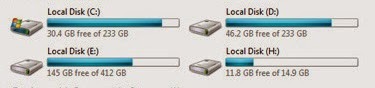
How are you? Hope you are very well. There are many software is available for hiding any local drive. But there are too expensive for us. Some people use crack /patch for that software but any crack/patch software is not reliable for us.
Anyway today I am going to show you a simple, easy and new way, how to hide any drive from your computer without any third-party software. If you want to hide your computerÕs drive just follow my bellow procedures.
Right click on my computer-->Click Manage--> Now will open a new wizard which name is Computer Management. From the left side click on Disk Management. Now from the right side chose any drive, which one you want to hide from your computer. Now right click on that --> then click on Change Drive Letter and PathsÉ--> Now you will see a new wizard and here is three options (Add, Change, Remove). Click the Remove button then click Yes. Close the Computer management wizard. Now go to my computer and see your one drive is vanished.
If you want to show your drive, right click on my computer --> Click Disk Management --> Now right click on that drive which one you have to hide. Click Change Drive Letter and PathsÉ --> Click Add --> Then click OK. Now close the Computer management wizard and go to my computer and see your drive is there which one you hide before. Enjoy yourselfÉÉ.
Video Of This Tutorial:
If you like this article and if you think these tricks are helpful, please share with your friends.
Thanks to all of my friends,
Md. Manjurul Islam (Rubel)
Go to link Download
Subscribe to:
Posts (Atom)