Showing posts with label why. Show all posts
Showing posts with label why. Show all posts
Monday, March 13, 2017
iTunes Backup Password Recovery Software Why Can It Recover iTunes Backup Password
iTunes Backup Password Recovery Software Why Can It Recover iTunes Backup Password
As is known, iTunes backup password recovery software canrecover forgotten or lost iTunes backup password. But do you know why it can do and how it does?
If not, follow this passage to learn and know about features of iTunes backup password recovery software.
Now we take one tool that can work on Windows computer to introduce, iTunes Password Genius. We will talk about it in 3 aspects to explain why it can be chosen as iTunes backup password recovery software.

1. Efficiency
iTunes Password Genius provides powerful function to recover iTunes backup password no matter how complex backup password is.
Powerful password recovery methods are designed in iTunes Password Genius, including Brute-force, Mask, Dictionary and Smart.
With Brute-force, you can recover any kinds of password, but the time wasted will depends on the complexity of password and settings you set for Brute-force. Appropriate password recovery settings can save most of time.
With Mask, iTunes backup password can be easily recovered if you remember part of backup password. Just "Mask" parameter and password length, range.
With Dictionary, you can lessen the password ranges. Shorten the password recovery time, because password is only found in Dictionary.
With Smart, it is set with one different search method from other password recovery types. So at some moments, it will be smart for you to choose it.
2. Safety
In a word, iTunes backup will not be damaged or lost. Any data on computer will not be damaged too.
The purpose of using iTunes Password Genius, is to recover iTunes backup password, and use it to unlock iTunes backup. So this feature is really so important.
There is no virus in this backup password recovery tool. And when it is run to recover backup password, only the iTunes backup file is imported into it. Other files on computer related with this file are not affected.
Besides, there is one part about backup password in Manifest.plist. And only this section is used by iTunes Password Genius to recover password. So other parts in imported file are not changed.
Therefore, no data would be lost or damaged after iTunes backup password recovery.
3. Availability
We can see its availability in user-friendly interface and continuous software update.
3-1 User-friendly interface
As long as you run iTunes Password Genius, and with simple introduction, you can see how to recover backup password with it. Open backup file Ð Choose Type of attack Ð Start to recover iTunes backup password.
3-2 Continuous software update
In addition, it keeps on update in order to recover all kinds of iTunes backup password. So it will be worth to have a try.
Related Articles:
- Create iTunes Backup| iTunes Backup Password Recovery Tips
- Encrypt iTunes Backup | iTunes Backup Password Recovery Tips
Go to link Download

Thursday, February 9, 2017
Why Surface Pro is Locked How to Unlock It
Why Surface Pro is Locked How to Unlock It
Accidently, we couldnÕt access Surface Pro. It is locked.
Why Surface Pro is locked? Probably it is because of following reasons.
Why Surface Pro is locked? Probably it is because of following reasons.
- Windows 8/8.1 user or login password is forgotten. So we couldnÕt login into Surface Pro.
- Windows 8/8.1 is controlled remotely when using PC tablet.
- Windows system is damaged.
- PC tablet hard disk is damaged.
Solution to unlock locked Surface Pro:
- Reset or recover Windows 8/8.1 password for Surface Pro.
- Right-click "Computer - Properties - Remote - Remote Desktop", uncheck the box "Permit User Remote Control the Computer".
- Boot Surface Pro from emergency CD and copy file from hard disk. And then restart Windows 8/8.1.
- Get a new hard disk for Surface Pro PC tablet.
Because there is no other available user accounts for Windows 8/8.1 logon, so now password reset disk or third-party tool is necessary. Therefore, we have two choices.
- Choice 1: Take prepared password reset disk to reset Windows password.
- Choice 2: Find a third-party Windows password recovery tool for Surface Pro.
Choice 1: Take password reset disk to reset Windows password.
If you have created a password reset disk before Surface Pro is locked, this would be safest and the most effective method.
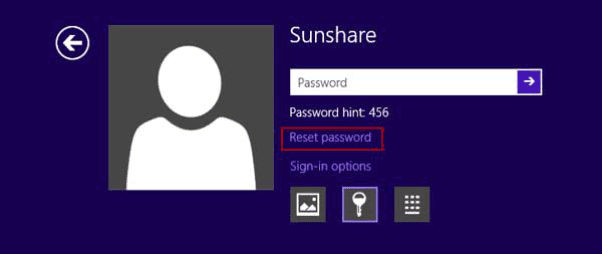
- When you try to login into Windows and an error message prompts, click "Reset Password" button under password input box.
- Password Reset Wizard window pops up. Insert password reset disk into Surface Pro, and click "Next".
- Choose password key disk from drop-down box. And click "Next".
- Type new password or donÕt set any password for Surface Pro logon.
- Click "Next" and "Finish" button and Windows 8/8.1 password is reset successfully.
Choice 2: Find a third-party Windows password recovery tool for Surface Pro.
Undoubtedly, third-party tool is a useful way when we couldnÕt find another way to solve Surface Pro lock problem. If you donÕt know how to find and choose which password recovery tool from lots of third-party tools, take Windows Password Genius Advanced to try. On efficiency and ease-of-use, it is worth for trying.
1. Search "Windows Password Genius Advanced" in Google, and download trial version to have a try. Or get full version to reset different kinds of complex Windows password.

2. Install it on another accessible computer and run it. Prepare bootable USB drive or CD/DVD-ROM and insert it into this computer. Now take USB drive.
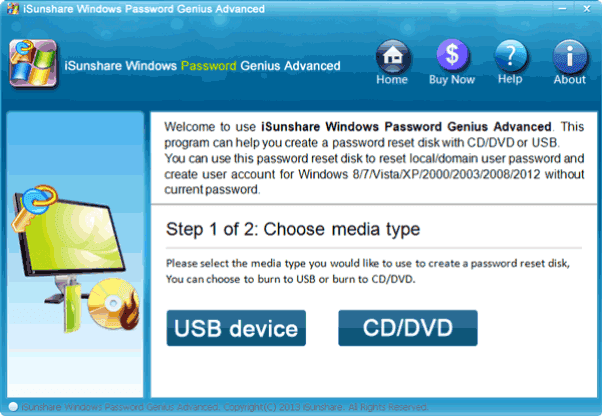
3. Choose "USB device" and click Next. Select inserted USB drive from drop-down box and click "Begin burning".
4. Until message prompts that reset disk is burned successfully, click "OK" and exit USB drive to get ready for unlocking Surface Pro.
5. Plug USB drive with reset disk into locked Surface Pro, start Windows and enter Boot option to set Windows boots from USB drive.
6. Windows Password Genius Advanced program runs automatically. Select Windows system and login user or administrator, click "Reset Password". It would reset user or administrator password as "iSunshare@2012".
Now you can choose to reboot Surface Pro to login and eject USB before Windows boots fully. Or continue to created new administrator with "Add User" for Surface Pro first, and then reboot PC tablet.
Related Articles:
Related Articles:
- Windows 8 Forgot Administrator Password on Microsoft Surface Pro
- Microsoft Surface Pro or Pro 2 Owner and User Password Reset
- How to Unlock Dell Computer Windows 8.1 Password Forgot
- How to Unlock Windows Server Domain Password Effectively
Go to link Download
Sunday, November 13, 2016
Why must you not to hear a huge collection of songs or music regularly
Why must you not to hear a huge collection of songs or music regularly
Crazy music people collect a lot of songs and hear the songs regularly in normal or shuffled mode. What is the most important reason to stop doing this anymore?
Just let get a thought about the memorization process of your memory. oh, sorry its not a SD. I talk about your brain above. You hear, listen or know something at very first. Could you memorize it and remember it after few days. I hope that, it is not possible all the time. ThatÕs why the students study or read subjects again and again. HavenÕt you? Are you with me? If yes,
Let come to the discussing topic above. You listen to a song or music which may duration up to 5 to 10 minutes. If you are gotten crazy in it, it is not possible to hear at once only. You may hear more than 5 times. Most of brains could memorize a full song if it is listened as little as 3 times. So, what do you think about the crazy people? I mentioned you above. The song will be thoroughly memorized in future.
If you have collected 500 songs or music and consisted in your device, what is its total duration? 3,500mins (assumed 7 min music). It is equal to 210,000s. Let guess one think, how many sec is taken to say a word? I thought, 2.1s (an average for to simplify the calculation too.) What a huge thing? This means, you have memorized 100,000 words as in the music list or songs. And also all the words are ordered according to the every music or song for individually.
Now, could you understand what the problem is? You are now losing your memory space and may be affected by amnesia in future. You may collect a 10 most favorite songs or music and then hear it again and again or memorize if you want? LOLÉ
What is the solution for this? I know, how hard to be without music or song if you are crazy in it as a music crazy dude? Update your music list every week or any scheduled order regularly. DonÕt forget to erase the old songs and then add new songs. I have a grateful idea for this. You could set to a favorite music station or FM which plays songs as new as daily. They update their list according to the trend. And also, you could to be relaxed in the remains times other than music such as sponsor ads and RJ word within the mean time.