Showing posts with label you. Show all posts
Showing posts with label you. Show all posts
Friday, April 28, 2017
WiFi ‰ÛÏLimited Connection‰Û or ‰ÛÏNo Internet Access‰Û 9 Solutions You Need to Know
WiFi ‰ÛÏLimited Connection‰Û or ‰ÛÏNo Internet Access‰Û 9 Solutions You Need to Know
Question 1: I need help because I have tried a lot of tricks but still canÕt connect to WiFi at all. I have been connected to my modem before but now all I see is limited connectivity which doesnÕt allow me to connect to the internet. What can I do?
Question 2: I recently ordered a new Lenovo laptop online. I got the y510p. My problem is when I connect to the WiFi it says limited connection. I have tried many "fixes" online but none have worked. I really need help. Does anyone know how to fix this?
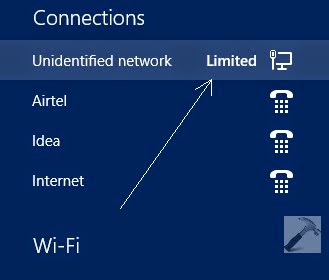 |
| WiFi Òlimited connectionÓ |
After installing Windows 8 or Windows 8.1, users frequently get into the trouble WiFi Òlimited connectionÓ or Òno Internet accessÓ. There are various reasons for that. According to the most common causes I summarize 10 solutions to cope with the trouble. Hope to help you well:
Solution 1: Examine whether your modem, adapter, router and access points are turned on and connected correctly.
- Make sure the modem, adapter and router are connected correctly and the lights are on.
- Re-seat all the cables and power cords.
- Start the computer and open the Windows Desktop. On the Windows desktop, click the Network Connection icon, then click the name of the network and click connect.
Solution 2: Reset power to router and modem
After working for a long time, your router or modem may crash temporarily. In this case you need to reset power to your router and modem. Please follow the steps below:
- Unplug the power to the wireless router and to the cable or DSL modem and wait at least 30 seconds before continuing.
- Reconnect the power to the modem and allow it to re-establish a connection to the ISP. If the modem has indicator lights, wait until the lights indicate a connection. (If using a separate wireless router, reconnect the power to the router and allow it to re-establish the connections to the modem and other components)
- After the modem and router have finished making connections, check whether your computer can connect to WiFi and have access to the Internet. If not, please refer to the following solutions.
Solution 3: Re-configuring the wireless network
- Get intoÓ Network and Sharing CenterÓ from control panel and then click ÒSet up a new connection or networkÓ.
- In the ÒChoose a connection optionÓ window, select ÒManually connect to a wireless networkÓ, and click ÒNextÓ.
- Type the required wireless network information, and then click ÒNextÓ and ÒcloseÓ.
- From the Windows desktop, click the Network Connection icon in the notification area, and then click the name of the network. Click "Connect". Enter the network password (or security key) for the selected wireless network, and then click ÒNextÓ.
Solution 4: Moving your computer closer to the router and avoid the influence of solid objects and electrical appliances
As is known to us, a wireless network router has a limited broadcast range. The further the computer is from the router, the weaker the broadcast signal. And also Solid objects such as walls, metal furniture, and electrical appliances might interfere with the signal and decrease the usable range. Thus you can move your computer closer to the router and prevent your computer form solid objects and electrical appliances.
Solution 5: Connect the computer directly to the network router with an Ethernet cable
To determine if the connection problem lies with the router settings or with the wireless signal you can follow this way. Detailed steps are as follows:
- Insert an Ethernet cable from one of the available ports on the router to the network port on the computer.
- Wait for one minute, and then check the Network Connection icon in the notification area on the Windows desktop.
- If the icon has an X in the lower corner, the connection is not working. Right-click the icon, and then click Troubleshoot problems. Windows Network Diagnostics checks for problems. If Window Network Diagnostics is not able to fix the issue, the router is not working properly. Refer to Solution 6: Resetting and reconfiguring the router
- If the icon does not have an X in the lower corner, the connection is working. Disconnect the Ethernet cable from the computer, and manually setup a new connection to the wireless network.
Solution 6: Resetting and reconfiguring the router
In case that your router is hacked and the information is changed is changed by others. This way will work. Refer to the instructions below:
- Enter the default IP addresses for the router into the URL address field on the browser. The following list provides default IP addresses for several routers.
3Com: http://192.168.1.1
D-Link: http://192.168.0.1
Linksys: http://192.168.1.1
Netgear: http://192.168.0.1 - After the home page for the router displays, type a password to perform configuration tasks. (See the User Guide for model specific information)
- When you have administrator access to the router, change the routers default name, sometimes it is called an SSID, a name that is different from other routers in your area.
- Set up Wi-Fi protected access (WPA) or wireless encryption (WEP) to prevent other computers from connecting to your home network.
- Enter a network access password, sometimes called a passphrase. Make sure to pick a password that is easy to remember, such as a phone number that you dial often or a phrase that is familiar.
Solution 7: Updating the router firmware
Outdated firmware may prevent the router from accessing the Internet or certain Web pages. Log into the home page for the router and update the routers firmware. Consult the User Guide that come with your manual for information on how to perform a firmware update.
Solution 8: Installing updated wireless LAN driver and Bios
If no network connection icon is displayed within 15 to 30 seconds after enabling the wireless network, or if a Windows Device not Found error message displays, the software driver might be missing or corrupt. To fix this, download and install the latest drivers and BIOS from the Internet. You must know the exact model number or product number for your computer. Be sure to select the correct operating system.
Solution 9: Restoring your Windows 8 system to a previous state
If the computer was able to connect to the wireless network in the past, but now cannot connect, perform a ÒMicrosoft System RestoreÓ. Make your computer return to the previous state.
With the nine solutions most people are supposed to solve their WiFi Òlimited connectionÓ or Òno Internet access problems. If the solutions above donÕt work for you donÕt hesitate to contact the manufacturer for support.
Go to link Download

Thursday, April 6, 2017
10 reasons you should evaluate before you buy the iPhone 3G
10 reasons you should evaluate before you buy the iPhone 3G
10 reasons you should evaluate before you buy the iPhone 3G
The 3G iPhone from Apple was received with much excitement and hype in more than 44 countries where it has been launched.
 But what about Brazil? Does the 3G iPhone will have the same receipt? And really worth buying it?
If you are the type of person who likes to analyze products and is more rational when buying, know 10 reasons before choosing the iPhone as your smartphone personnel.
1 - No slot for memory expansion
Available in versions with 8 GB and 16 GB of internal memory, the gadget appears to have enough storage capacity. But considering that it has a built-in iPod that plays music and videos, the space tends to decrease rapidly as the user will transferring your files or producing images. Therefore, a slot for memory card would be more than welcome. There are already on the market, for example, memory cards of the type SDHC (an evolution of SD) with 16 GB, which would double or even triple the capacity of the iPhone.
2 - Few authorized warranty service
According to Apple Brazil are only 37 centers throughout Brazil. The companys website states that the State of S‹o Paulo has 12 (ten being the capital).
3 - No video call
One of the coolest features enabled by the 3G network is not available on iPhone. The reason is simple: the terminal does not have front camera, so its not possible for two people to talk on the phone and see at the same time.
4 - Median Camera and without flash
With 2 megapixel resolution, the iPhones camera is better than those with standard VGA that equipped older phones. Still, it is well below the quality produced by newer devices. LG, Nokia, Samsung and Sony-Ericsson are some of the manufacturers now offer cameras with a resolution of 5 MP (or even greater than that), good lenses and flash perfected, another feature that the Apple smartphone also has.
5 - Support video recording does not come from factory
Another function that suppresses the iPhone is to record videos, or even those in low resolution. You can have the feature by installing third-party software, but they fall short. Ideally, this feature would already built factory.
6 - Internal Battery
If you are those who walk with an extra supply for not running out of power and can use your phone ever, forget. The iPhone battery is internal, that is, you cannot replace it easily. When it is worn enough that you need to replace it, you must go to a service center.
7 - Bluetooth half
The resort has a limited connection to another device from Apple or devices authorized by the company. In practice, if you have a headset from another brand it may not work with the iPhone. Another restriction is the transfer of files to other phones with Bluetooth (you cannot send them nor receive them).
8 - Office Files? Just to see
The Apple iPhone 3G has incorporated the ability to open Microsoft Office files (Word, Excel and PowerPoint) and also those with PDF extension. But no edit documents. This function is not trivial in many smartphones, but it was expected the phone from Apple, whose second generation also wants its share in the corporate smartphone market.
9 - Assisted GPS
Instead of using a separate receiver satellite signals, as do other phones, the iPhone uses triangulation of cell phone antennas. Besides not being precise, the feature can be quite time consuming to start functioning. But when it works.
10 - Corporate use? Not yet
If you want to use the iPhone as a phone company, you better think twice. This is because the BlackBerry, for example, is much more efficient in this task, so for having the standard QWERTY keyboard which can be operated with both hands. The keyboard on the screen, activated by the touch of the fingers, is visually interesting, but can be tiring when it comes to typing longer messages. In addition, the e-mail control BlackBerry is more efficient, even with the iPhone already offering support for corporate e-mail manager Microsoft Exchange.
Go to link Download
Monday, March 6, 2017
World Top 15 Best Websites that can make you a Web Designer
World Top 15 Best Websites that can make you a Web Designer
http://m14hackersworld.blogspot.com
World Top 15 Best Websites that can make you a Web Designer

It is very easy to say that i want to make my own website but Friends its a very difficult job if you dont know about programming and such famous languages HTML,JavaScript,Css are the basic building of a webpage.ÊIf you want a real and good web designer and also want a ful Grip on web designing so have a good knowledge of this languages which names is mentioned above. This article is for those who wants to learn how to make a website, all the websites listed below have very accurate information and you can easily learn web designing step by step.
Read more È
Go to link Download
Sunday, November 13, 2016
Why must you not to hear a huge collection of songs or music regularly
Why must you not to hear a huge collection of songs or music regularly
Crazy music people collect a lot of songs and hear the songs regularly in normal or shuffled mode. What is the most important reason to stop doing this anymore?
Just let get a thought about the memorization process of your memory. oh, sorry its not a SD. I talk about your brain above. You hear, listen or know something at very first. Could you memorize it and remember it after few days. I hope that, it is not possible all the time. ThatÕs why the students study or read subjects again and again. HavenÕt you? Are you with me? If yes,
Let come to the discussing topic above. You listen to a song or music which may duration up to 5 to 10 minutes. If you are gotten crazy in it, it is not possible to hear at once only. You may hear more than 5 times. Most of brains could memorize a full song if it is listened as little as 3 times. So, what do you think about the crazy people? I mentioned you above. The song will be thoroughly memorized in future.
If you have collected 500 songs or music and consisted in your device, what is its total duration? 3,500mins (assumed 7 min music). It is equal to 210,000s. Let guess one think, how many sec is taken to say a word? I thought, 2.1s (an average for to simplify the calculation too.) What a huge thing? This means, you have memorized 100,000 words as in the music list or songs. And also all the words are ordered according to the every music or song for individually.
Now, could you understand what the problem is? You are now losing your memory space and may be affected by amnesia in future. You may collect a 10 most favorite songs or music and then hear it again and again or memorize if you want? LOLÉ
What is the solution for this? I know, how hard to be without music or song if you are crazy in it as a music crazy dude? Update your music list every week or any scheduled order regularly. DonÕt forget to erase the old songs and then add new songs. I have a grateful idea for this. You could set to a favorite music station or FM which plays songs as new as daily. They update their list according to the trend. And also, you could to be relaxed in the remains times other than music such as sponsor ads and RJ word within the mean time.

Solution 1: Reset Dell password with a previous created Windows 7 password reset disk
As far as IÕm concerned, a Dell password reset disk is the best way to prevent you from forgetting your password. Thus when you install a new system in your computer youÕd better to remember to create a password reset disk. If you have no password reset disk at hand, donÕt worry, you can turn to the solutions below.
1. Start your locked Dell computer. Enter the wrong password at the login box, and then Windows will display a message that the password is incorrect. Click ÒOKÓ to close the message. After that you will see ÒReset passwordÓ under the login box, click it and then insert the password reset disk you have created.
2. Follow the instructions in the ÒPassword Reset WizardÓ to create a new password.
3. After you finish the steps above you are supposed to log on with the new password.
Note: This method requires that you have created a password reset disk before you have lost the login password.
Solution 2: Logon with another administrator account to remove Dell password Windows 7
If you can log in to your Dell computer with another administrator account then you can continue in this solution.
1. Log on with another administrator account or account which has administration authority to remove Dell password on the other accounts.
2. Click the ÒStartÓ button, type Òlusrmgr.mscÓ in the Search box and then press ÒENTERÓ. ? Then you will get into ÒLocal Users and GroupsÓ.
3. Double-click ÒLocal Users and GroupsÓ, and then click ÒUsersÓ.
4. Right-click the target account which you want to remove the password for, and then click ÒSet PasswordÓ. Type and confirm the new password.
5. Assuming that you have completed the operations above then you will login with the newly created account.
Solution 3: Reset Windows 7 password on Dell from Safe Mode
As is known to us, Windows 7 system has a built-in administrator account that is created during Windows installation and disabled by default, which has no password in it. You need to enable the built-in Administrator account first. If not, you will not succeed.
Step 1: Start your computer and pressÒF8?. Choose ÒSafe Mode with Command PromptÓ with the arrow key and press ÒEnter.ÓThen your computer will get into Safe Mode with Command Prompt.
Step 2: Select the Administrator account appearing on the screen, then enter command prompt. Type: net user Ò****** 123456Ó and enter (****** is the account name and 123456 is the new password), then a messageÐÒthe command completed successfullyÓ will appear on the screen.
Step 3: Restart your win 7 computer, then you can log in as ****** with the password 123456. You can go to Control Panel to change your account password if necessary.
Solution 4: Recover Windows 7 password on Dell with Windows Password Recovery?http://www.lostwindowspassword.com/windows-password-recovery.htm?
If you have neither another administrator account nor Windows password reset disk, youÕd better to recover Windows 7 password on Dell computer with Windows Password Recovery. Just follow the steps below:
1. Download the program on any PC you have access to.
2. Run the downloaded file to install it.
3. Burn a bootable CD/DVD or USB Flash Drive and remove Windows password with the burned CD/DVD or USB Flash Drive on your locked PC.
If you have any question about using the program please refer to the video guide below:
Go to link Download
Subscribe to:
Posts (Atom)